
Div 弹窗
Div Popup
你将学到什么
- preUpdate(相对 postRender 更早)同步 DOM 位置
- 简单 信息窗 / Tooltip 实现
- 坐标不可见时 display: none
效果说明
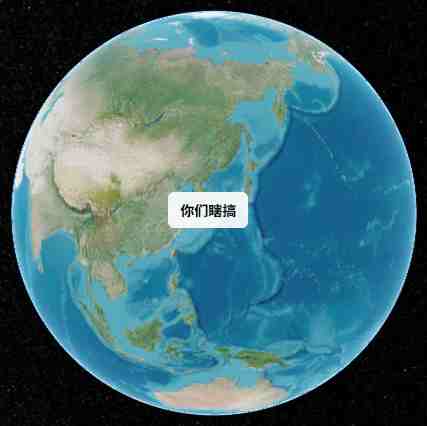
山东附近坐标 (118°, 37°) 处悬浮白底圆角 div,文字「你们瞎搞」,随相机转动始终锚定在对应地理位置。
核心概念
preUpdate vs postRender
| 事件 | 时机 |
|---|---|
| preUpdate | 场景更新前,适合跟实体同步 |
| postRender | 帧渲染后,CSS 元素 案例使用 |
两者都可配合 worldToWindowCoordinates。
最小实现
js
const el = document.createElement('div');
Object.assign(el.style, {
    position: 'absolute',
    backgroundColor: 'rgba(255,255,255,0.9)',
    padding: '8px 12px',
    borderRadius: '6px',
});
box.appendChild(el);

viewer.scene.preUpdate.addEventListener(updatePosition);

function updatePosition() {
    const coord = Cesium.SceneTransforms.worldToWindowCoordinates(
        viewer.scene,
        Cesium.Cartesian3.fromDegrees(118, 37, 1)
    );
    if (coord) {
        el.style.left = coord.x + 'px';
        el.style.top = coord.y + 'px';
        el.style.display = 'block';
    } else {
        el.style.display = 'none';
    }
}
生产增强
可加 leader line、点击关闭、多弹窗管理器;复杂场景见 Cesium 社区 HtmlOverlay 插件。
实现步骤
- 创建样式化 div append 到 Viewer 容器
flyTo初始定位preUpdate每帧投影更新 left/top- 根据业务动态改
innerHTML
源码
完整源码见 GitHub。
小结
基础功能 · Cesium.js · 19/19 ✅