
地图滤镜
Map Filter
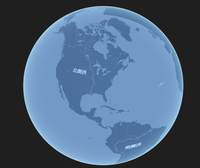
你将学到什么
- Cesium Viewer 初始化
- Cesium 影像图层
效果说明
Cesium 在线底图图层。
在线地图 · Cesium.js
核心概念
Viewer 封装地球、相机、图层;可关闭 animation/timeline 等 UI 精简界面。
ImageryLayer 叠加 XYZ/WMTS/ArcGIS 等底图,
imageryLayers.add/remove管理。
实现步骤
- 初始化
Cesium.Viewer与底图图层 - 添加 Entity / Primitive / DataSource 等业务对象
- 按需
camera.flyTo定位视角
代码要点
setViewerTheme()— 案例中的独立逻辑模块,建议在线编辑器中跳转阅读
源码
js
import * as Cesium from 'cesium'

const box = document.getElementById('box')

const viewer = new Cesium.Viewer(box, {

    animation: false,//是否创建动画小器件,左下角仪表

    baseLayerPicker: false,//是否显示图层选择器,右上角图层选择按钮

    fullscreenButton: false,//是否显示全屏按钮,右下角全屏选择按钮

    geocoder: false,//是否显示geocoder小器件,右上角查询按钮

    homeButton: false,//是否显示Home按钮,右上角home按钮

    sceneMode: Cesium.SceneMode.SCENE3D,//初始场景模式

    sceneModePicker: false,//是否显示3D/2D选择器,右上角按钮

    navigationHelpButton: false,//是否显示右上角的帮助按钮

    selectionIndicator: false,//是否显示选取指示器组件

    timeline: false,//是否显示时间轴

    infoBox: false,//是否显示信息框

    scene3DOnly: true,//如果设置为true,则所有几何图形以3D模式绘制以节约GPU资源

    orderIndependentTranslucency: false, //是否启用无序透明

    contextOptions: { webgl: { alpha: true } },

    skyBox: new Cesium.SkyBox({ show: false }),

    baseLayer: false, // 不显示默认图层

})

viewer.imageryLayers.addImageryProvider(

    new Cesium.UrlTemplateImageryProvider({

        url: 'https://webrd02.is.autonavi.com/appmaptile?lang=zh_cn&size=1&scale=2&style=8&x={x}&y={y}&z={z}',

        maximumLevel: 18

    })

)

setViewerTheme(viewer) // 设置主题

function setViewerTheme(viewer, options = {}) {

    const baseLayer = viewer.imageryLayers.get(0)

    if (!baseLayer) return

    baseLayer.brightness = options.brightness ?? 0.6

    baseLayer.contrast = options.contrast ?? 1.8

    baseLayer.gamma = options.gamma ?? 0.3

    baseLayer.hue = options.hue ?? 1

    baseLayer.saturation = options.saturation || 0

    const baseFragShader = (viewer.scene.globe)._surfaceShaderSet.baseFragmentShaderSource.sources

    for (let i = 0; i < baseFragShader.length; i++) {

        const strS = 'color = czm_saturation(color, textureSaturation);\n#endif\n'

        let strT = 'color = czm_saturation(color, textureSaturation);\n#endif\n'

        if (!options.invertColor) {

            strT += `
                color.r = 1.0 - color.r;
                color.g = 1.0 - color.g;
                color.b = 1.0 - color.b;
            `

        }

        strT += `
            color.r = color.r * ${options.filterRGB_R ?? 100}.0/255.0;
            color.g = color.g * ${options.filterRGB_G ?? 138}.0/255.0;
            color.b = color.b * ${options.filterRGB_B ?? 230}.0/255.0;
        `

        baseFragShader[i] = baseFragShader[i].replace(strS, strT)

    }

    viewer.scene.requestRender();

}
小结
在线地图 · Cesium.js