
点云第一人称漫游,碰撞检测
Point Cloud FPS Octree
你将学到什么
- 相机交互控制器
- 天空盒与环境贴图
- 点云 / 粒子 / 实例化渲染
- requestAnimationFrame 渲染循环
- Clock 帧间隔计时
效果说明
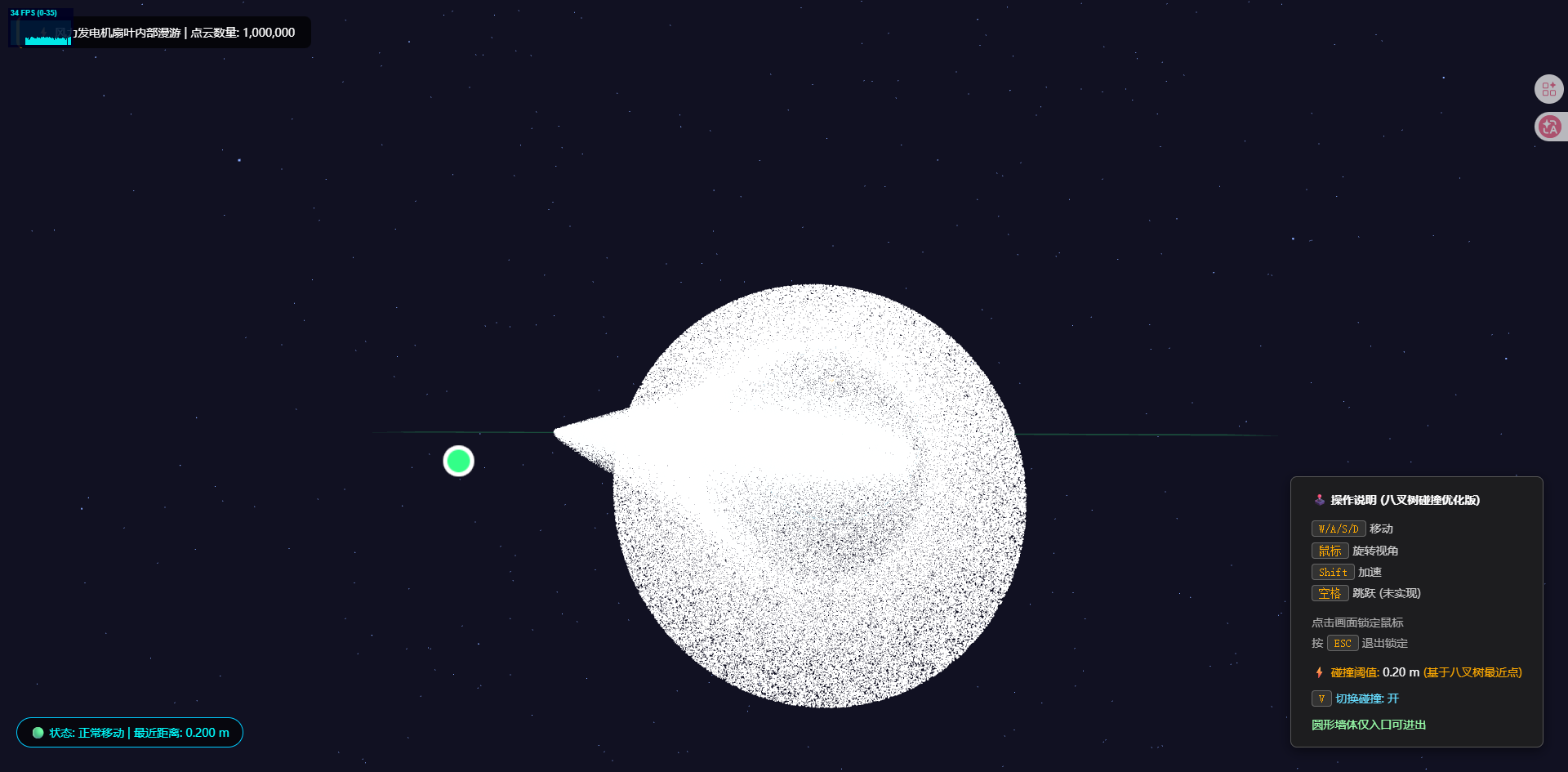
Three.js 业务向场景组合。入口在 OctreeCollisionField。
应用场景 · Three.js
核心概念
OrbitControls 轨道旋转缩放;开
enableDamping时每帧需controls.update()。CubeTexture 六面贴图作
scene.background;scene.environment供 PBR 材质反射。Points 大量顶点用点精灵渲染;InstancedMesh 相同几何体批量绘制,降低 draw call。
实现步骤
- 搭建 Scene / Camera / Renderer 与 OrbitControls
- rAF 循环中 update 并 render
代码要点
createAnchorSprite()— 案例中的独立逻辑模块,建议在线编辑器中跳转阅读addAnchors()— 案例中的独立逻辑模块,建议在线编辑器中跳转阅读updateWallVisualization()— 案例中的独立逻辑模块,建议在线编辑器中跳转阅读generateMockFanBladePoints()— 案例中的独立逻辑模块,建议在线编辑器中跳转阅读centerGeometryPositions()— 案例中的独立逻辑模块,建议在线编辑器中跳转阅读useMockData()— 案例中的独立逻辑模块,建议在线编辑器中跳转阅读
源码
js
import * as THREE from 'three'
import { PointerLockControls } from 'three/examples/jsm/controls/PointerLockControls.js'
import Stats from 'three/examples/jsm/libs/stats.module.js'

const box = document.getElementById('box')
box.style.position = 'relative'

const style = document.createElement('style')
style.textContent = `
    .pc-info { position: absolute; top: 20px; left: 20px; background: rgba(0,0,0,0.7); color: #fff; padding: 10px 20px; border-radius: 8px; pointer-events: none; z-index: 100; font-size: 14px; border-left: 4px solid #ffaa00; }
    .pc-status { position: absolute; bottom: 30px; left: 20px; background: rgba(0,0,0,0.6); color: #0ff; padding: 8px 16px; border-radius: 20px; font-size: 14px; pointer-events: none; z-index: 100; backdrop-filter: blur(5px); border: 1px solid #00ccff; }
    .pc-instruction { position: absolute; bottom: 30px; right: 30px; background: rgba(30,30,30,0.85); color: #ccc; padding: 15px 25px; border-radius: 8px; font-size: 14px; line-height: 1.8; border: 1px solid #555; pointer-events: none; z-index: 100; box-shadow: 0 4px 15px rgba(0,0,0,0.5); backdrop-filter: blur(5px); }
    .pc-instruction kbd { background: #333; border-radius: 4px; padding: 2px 8px; color: #ffaa00; border: 1px solid #666; }
    .pc-warning { position: absolute; top: 50%; left: 50%; transform: translate(-50%, -50%); color: red; font-size: 24px; font-weight: bold; text-shadow: 0 0 20px rgba(255,0,0,0.8); z-index: 200; pointer-events: none; opacity: 0; transition: opacity 0.1s; background: rgba(0,0,0,0.5); padding: 10px 30px; border-radius: 50px; border: 2px solid red; }
    .pc-warning.show { opacity: 1; }
`
document.head.appendChild(style)

const info = document.createElement('div')
info.className = 'pc-info'
info.innerHTML = '⚡ 风力发电机扇叶内部漫游 | 点云数量: <span id="pointCount">加载中...</span>'

const status = document.createElement('div')
status.className = 'pc-status'
status.innerHTML = '🟢 状态: 正常移动 | 最近距离: <span id="nearestDist">-</span> m'

const instruction = document.createElement('div')
instruction.className = 'pc-instruction'
instruction.innerHTML = `
    <div style="color:#fff; margin-bottom:10px; font-weight:bold;">🕹️ 操作说明 (八叉树碰撞优化版)</div>
    <div><kbd>W/A/S/D</kbd> 移动</div>
    <div><kbd>鼠标</kbd> 旋转视角</div>
    <div><kbd>Shift</kbd> 加速</div>
    <div><kbd>空格</kbd> 跳跃 (未实现)</div>
    <div style="margin-top:10px; color:#aaa;">点击画面锁定鼠标<br>按 <kbd>ESC</kbd> 退出锁定</div>
    <div style="margin-top:10px; color:#ffaa00;">⚡ 碰撞阈值: <span style="color:#fff;">0.20 m</span> (基于八叉树最近点)</div>
    <div style="margin-top:6px; color:#66ddff;"><kbd>V</kbd> 切换碰撞: <span id="collisionToggle">开</span></div>
    <div style="margin-top:6px; color:#99ffaa;">圆形墙体仅入口可进出</div>
`

const warning = document.createElement('div')
warning.className = 'pc-warning'
warning.textContent = '⚠️ 碰撞阻挡'

box.append(info, status, instruction, warning)

const pointCountSpan = info.querySelector('#pointCount')
const nearestDistSpan = status.querySelector('#nearestDist')
const warningDiv = warning
const collisionToggleSpan = instruction.querySelector('#collisionToggle')

const scene = new THREE.Scene()
scene.background = new THREE.Color(0x111122)

const camera = new THREE.PerspectiveCamera(75, box.clientWidth / box.clientHeight, 0.1, 1000)
camera.position.set(-1.345, 0.2, -11.57)

const renderer = new THREE.WebGLRenderer({ antialias: true, powerPreference: 'default' })
renderer.setSize(box.clientWidth, box.clientHeight)
renderer.setPixelRatio(Math.min(window.devicePixelRatio, 2))
box.appendChild(renderer.domElement)

const stats = new Stats()
stats.showPanel(0)
stats.dom.style.position = 'absolute'
stats.dom.style.left = '10px'
stats.dom.style.top = '10px'
box.appendChild(stats.dom)

scene.add(new THREE.AmbientLight(0x404060))
const dirLight = new THREE.DirectionalLight(0xffffff, 0.8)
dirLight.position.set(1, 2, 1)
scene.add(dirLight)

const starsGeo = new THREE.BufferGeometry()
const starsCount = 2000
const starPositions = new Float32Array(starsCount * 3)
for (let i = 0; i < starsCount * 3; i += 3) {
    starPositions[i] = (Math.random() - 0.5) * 200
    starPositions[i + 1] = (Math.random() - 0.5) * 200
    starPositions[i + 2] = (Math.random() - 0.5) * 200
}
starsGeo.setAttribute('position', new THREE.BufferAttribute(starPositions, 3))
const starsMat = new THREE.PointsMaterial({ color: 0x88aaff, size: 0.1, transparent: true })
const stars = new THREE.Points(starsGeo, starsMat)
scene.add(stars)

let pointCloud = null
let collisionDetector = null
const clock = new THREE.Clock()
const raycaster = new THREE.Raycaster()
const mouse = new THREE.Vector2()
const anchorSprites = []

const moveState = { forward: false, backward: false, left: false, right: false, shift: false }
const speed = 0.5
const collisionThreshold = 0.1
let collisionEnabled = true

let wallRadius = 2.0
let wallEntranceAngle = 0.0
let wallEntranceHalfWidth = Math.PI / 10
let wallEntranceZMin = -1.0
let wallEntranceZMax = 1.0
let wallRing = null
let wallDoor = null

function createAnchorSprite(colorHex) {
    const canvas = document.createElement('canvas')
    canvas.width = 64
    canvas.height = 64
    const ctx = canvas.getContext('2d')
    ctx.fillStyle = 'rgba(0,0,0,0)'
    ctx.fillRect(0, 0, 64, 64)
    ctx.beginPath()
    ctx.arc(32, 32, 14, 0, Math.PI * 2)
    ctx.fillStyle = '#ffffff'
    ctx.fill()
    ctx.beginPath()
    ctx.arc(32, 32, 10, 0, Math.PI * 2)
// ... 完整源码见在线案例编辑器
小结
应用场景 · Three.js