
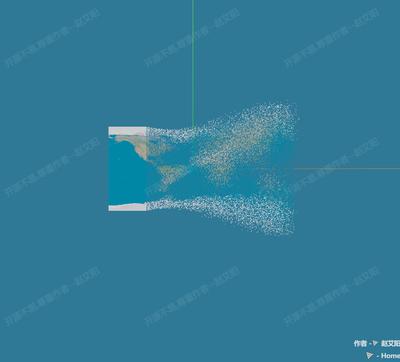
颗粒图像
Image Part
你将学到什么
- 相机交互控制器
- 天空盒与环境贴图
- requestAnimationFrame 渲染循环
效果说明
Three.js 片元/顶点着色器改颜色与形变。
着色器 · Three.js
核心概念
OrbitControls 轨道旋转缩放;开
enableDamping时每帧需controls.update()。CubeTexture 六面贴图作
scene.background;scene.environment供 PBR 材质反射。
实现步骤
- 搭建 Scene / Camera / Renderer 与 OrbitControls
- rAF 循环中 update 并 render
代码要点
bezier()— 案例中的独立逻辑模块,建议在线编辑器中跳转阅读h()— 案例中的独立逻辑模块,建议在线编辑器中跳转阅读
源码
js
import * as THREE from 'three'
import { OrbitControls } from 'three/examples/jsm/controls/OrbitControls.js'

// 创建渲染器对象
var renderer = new THREE.WebGLRenderer();
renderer.setSize(window.innerWidth, window.innerHeight);
renderer.setPixelRatio(window.devicePixelRatio); // 设置像素比
document.body.appendChild(renderer.domElement); //body元素中插入canvas对象

// 创建场景对象
var scene = new THREE.Scene();
scene.background = new THREE.Color("#347897");

// 创建相机
const far = 500000;
const camera = new THREE.PerspectiveCamera(75, window.innerWidth / window.innerHeight, 0.1, far);
camera.position.set(0, 0, 300);

// 点光源
var point = new THREE.PointLight("#fff", 1);
point.position.set(140, 200, 300); // 点光源位置
scene.add(point); // 点光源添加到场景中

// 环境光
var ambient = new THREE.AmbientLight("#fff", 2);
scene.add(ambient);

// 添加辅助线
const axisHelper = new THREE.AxesHelper(500);
scene.add(axisHelper);

// 创建控制器
const controls = new OrbitControls(camera, renderer.domElement);
//controls.autoRotate = true;

// 渲染
requestAnimationFrame(function render() {
    requestAnimationFrame(render);
    controls.update(); // Update controls
    renderer.render(scene, camera);
});

// 创建几何体
const width = 200; // 宽度
const height = 100; // 高度
const positionArr = []; // 顶点
const normalArr = []; // 法线
const uvArr = []; // uv
const geometry = new THREE.PlaneGeometry(width, height, 1 * width, 1 * height);
Array.from(geometry.index.array).forEach((vertexIndex) => {
    let tArr = geometry.attributes.position.array;
    let i = vertexIndex * 3;
    positionArr.push(tArr[i], tArr[i + 1], tArr[i + 2]); // 顶点

    tArr = geometry.attributes.normal.array;
    i = vertexIndex * 3;
    normalArr.push(tArr[i], tArr[i + 1], tArr[i + 2]); // 法线

    tArr = geometry.attributes.uv.array;
    i = vertexIndex * 2;
    uvArr.push(tArr[i], tArr[i + 1]); // uv
});
let bufferGeometry = new THREE.BufferGeometry(); // 缓冲几何体
bufferGeometry.setAttribute("position", new THREE.BufferAttribute(new Float32Array(positionArr), 3));
bufferGeometry.setAttribute("originPosition", new THREE.BufferAttribute(new Float32Array(positionArr), 3));
bufferGeometry.setAttribute("normal", new THREE.BufferAttribute(new Float32Array(normalArr), 3));
bufferGeometry.setAttribute("uv", new THREE.BufferAttribute(new Float32Array(uvArr), 2));
bufferGeometry.faceAnimateArr = [];
for (let i = 0; i < bufferGeometry.attributes.position.count; i++) {
    // 三角面
    if (i % 3 == 0) {
        const y = bufferGeometry.attributes.position.array[i * 3 + 1];
        const y_sign = Math.sign(y);
        let obj = {
            circle: 1500, // 周期
            startTime: null, // 起始时间
            progress: 0, // 进度
            bezier: null, // 贝赛尔曲线
        };
        const start = { x: 0, y: 0, z: 0 }; // 起点
        const end = start; // 终点
        let control1 = { x: Math.random() * 50, y: y_sign * (Math.random() * 80), z: 0 }; // 控制点1
        let control2 = { x: Math.random() * 50, y: -y_sign * 20, z: 0 }; // 控制点2
        obj.bezier = { start, control1, control2, end };
        bufferGeometry.faceAnimateArr.push(obj);
    }
}

// 材质
const material = new THREE.MeshStandardMaterial({
    map: new THREE.TextureLoader().load(FILE_HOST + 'threeExamples/application/flyLine/earth.jpeg'),
    side: THREE.DoubleSide,
});

// 平面
const plane = new THREE.Mesh(bufferGeometry, material);
scene.add(plane);

// 贝塞尔曲线
function bezier(P0, P1, P2, P3, t) {
    const x = P0.x * (1 - t) * (1 - t) * (1 - t) + 3 * P1.x * t * (1 - t) * (1 - t) + 3 * P2.x * t * t * (1 - t) + P3.x * t * t * t;
    const y = P0.y * (1 - t) * (1 - t) * (1 - t) + 3 * P1.y * t * (1 - t) * (1 - t) + 3 * P2.y * t * t * (1 - t) + P3.y * t * t * t;
    const z = P0.z * (1 - t) * (1 - t) * (1 - t) + 3 * P1.z * t * (1 - t) * (1 - t) + 3 * P2.z * t * t * (1 - t) + P3.z * t * t * t;
    return { x, y, z };
}

// 碎片运动
let startTime = Date.now(); // 开始时间
const circle = 1500; // 周期
let progress = 0; // 进度
requestAnimationFrame(function h() {
    requestAnimationFrame(h);
    progress = (Date.now() - startTime) / circle; // 计算进度
    if (progress > 1) progress = 1;
    let startX = -width / 2;
    let currX = startX + width * progress;

    // 遍历三角面
    bufferGeometry.faceAnimateArr.forEach((face, index) => {
        const tArr = bufferGeometry.attributes.originPosition.array; // 类数组对象
// ... 完整源码见在线案例编辑器
小结
着色器 · Three.js