
采样波
Samplex Wave
你将学到什么
- EffectComposer 后期处理管线
- 相机交互控制器
- 实时阴影 ShadowMap
- 天空盒与环境贴图
- 点云 / 粒子 / 实例化渲染
效果说明
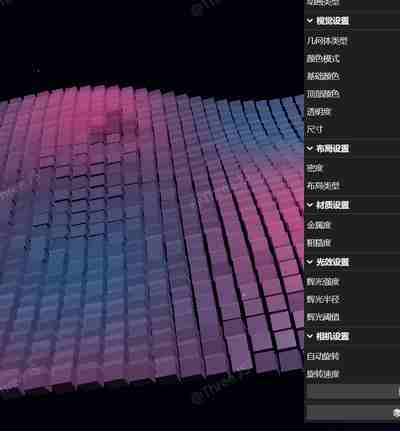
原场景 + 后期 Pass 叠加。use Claude 3.7 sonnect Thinking Preivew in vscode github copilot generate all code。入口在 EnhancedNoise。
应用场景 · Three.js
核心概念
EffectComposer 多 Pass 链式渲染:RenderPass → 特效 Pass → 输出屏幕。
composer.render()替代renderer.render()。OrbitControls 轨道旋转缩放;开
enableDamping时每帧需controls.update()。阴影四步:
renderer.shadowMap.enabled、光源castShadow、物体castShadow、地面receiveShadow。CubeTexture 六面贴图作
scene.background;scene.environment供 PBR 材质反射。
实现步骤
- 搭建 Scene / Camera / Renderer 与 OrbitControls
- EffectComposer 组装 Pass 链并 render
代码要点
createStars()— 案例中的独立逻辑模块,建议在线编辑器中跳转阅读getColor()— 案例中的独立逻辑模块,建议在线编辑器中跳转阅读createGeometry()— 案例中的独立逻辑模块,建议在线编辑器中跳转阅读Shape()— 案例中的独立逻辑模块,建议在线编辑器中跳转阅读generateShapes()— 案例中的独立逻辑模块,建议在线编辑器中跳转阅读regenerateShapes()— 案例中的独立逻辑模块,建议在线编辑器中跳转阅读
源码
js
import * as THREE from 'three';
import { OrbitControls } from 'three/examples/jsm/controls/OrbitControls.js';
import { GUI } from 'three/examples/jsm/libs/lil-gui.module.min.js';
import { EffectComposer } from 'three/examples/jsm/postprocessing/EffectComposer.js';
import { RenderPass } from 'three/examples/jsm/postprocessing/RenderPass.js';
import { UnrealBloomPass } from 'three/examples/jsm/postprocessing/UnrealBloomPass.js';

// 获取容器元素
const box = document.getElementById('box');

// 创建场景
const scene = new THREE.Scene();
scene.background = new THREE.Color(0x000000);

// 设置渲染器
const renderer = new THREE.WebGLRenderer({ antialias: true });
renderer.setSize(box.clientWidth, box.clientHeight);
renderer.setPixelRatio(Math.min(window.devicePixelRatio, 2));
renderer.toneMapping = THREE.ACESFilmicToneMapping;
renderer.toneMappingExposure = 1.2;
box.appendChild(renderer.domElement);

// 创建相机
const camera = new THREE.PerspectiveCamera(45, box.clientWidth / box.clientHeight, 0.1, 100);
camera.position.set(0, 20, 35);
scene.add(camera);

// 创建控制器
const controls = new OrbitControls(camera, renderer.domElement);
controls.enableDamping = true;
controls.dampingFactor = 0.25;
controls.enableZoom = true;

// 添加灯光
const ambientLight = new THREE.AmbientLight(0x555555);
scene.add(ambientLight);

const light1 = new THREE.DirectionalLight(0xffffff, 1);
light1.position.set(0, 30, 0);
scene.add(light1);

const light2 = new THREE.DirectionalLight(0xffffff, 1);
light2.position.set(30, 30, 0);
scene.add(light2);

// 创建后期处理效果
const composer = new EffectComposer(renderer);
const renderPass = new RenderPass(scene, camera);
composer.addPass(renderPass);

// 辉光效果
const bloomPass = new UnrealBloomPass(
  new THREE.Vector2(box.clientWidth, box.clientHeight),
  0.8, // 强度
  0.35, // 半径
  0.9  // 阈值
);
composer.addPass(bloomPass);

// 创建环境
scene.fog = new THREE.FogExp2(0x000819, 0.0025);
scene.background = new THREE.Color(0x000819); // 深蓝色背景

// 添加星空背景
function createStars() {
  const starsGeometry = new THREE.BufferGeometry();
  const starsCount = 3000;
  const positions = new Float32Array(starsCount * 3);
  const sizes = new Float32Array(starsCount);

  for (let i = 0; i < starsCount; i++) {
    positions[i * 3] = (Math.random() - 0.5) * 200;
    positions[i * 3 + 1] = (Math.random() - 0.5) * 200 + 50;
    positions[i * 3 + 2] = (Math.random() - 0.5) * 200;
    sizes[i] = Math.random() * 2;
  }

  starsGeometry.setAttribute('position', new THREE.BufferAttribute(positions, 3));
  starsGeometry.setAttribute('size', new THREE.BufferAttribute(sizes, 1));

  const starsMaterial = new THREE.PointsMaterial({
    color: 0xffffff,
    sizeAttenuation: true,
    transparent: true,
    blending: THREE.AdditiveBlending,
    size: 0.1
  });

  const stars = new THREE.Points(starsGeometry, starsMaterial);
  scene.add(stars);
}
createStars();

// 参数设置 - 增强版
const params = {
  // 波浪参数
  simplexVariation: 0.05,
  simplexAmp: 2.0,
  waveSpeed: 1.0,

  // 视觉参数
  geometry: 'box',
  colorMode: 'gradient',
  baseColor: 0x2bc1ff,
  topColor: 0xff4b8c,
  opacity: 0.7,
  size: 0.8,
  metalness: 0.5,
  roughness: 0.2,

  // 密度参数
  density: 0.8,

  // 效果参数
  bloomStrength: 0.8,
  bloomRadius: 0.35,
  bloomThreshold: 0.9,

  // 相机设置
  autoRotate: true,
// ... 完整源码见在线案例编辑器
小结
应用场景 · Three.js