
三维转屏幕坐标
World to Screen
你将学到什么
vector.project(camera)世界坐标 → NDC → 屏幕像素- 不用 CSS2DRenderer 的 手动 DOM 跟随 写法
- 每帧在 rAF 里更新标签位置
效果说明
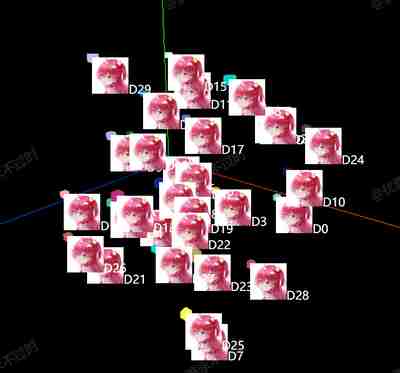
30 个小立方体,每个上方有一个 绝对定位的 DOM(图片 + 文字 D0~D29),随立方体在屏幕上移动而移动,像简易版 3D 标牌。
核心概念
project 管线
世界坐标 (World)
    ↓ matrixWorld × projectionMatrix
NDC 归一化设备坐标 (-1 ~ 1)
    ↓ 视口变换
屏幕像素 (px)
js
const worldPosition = mesh.getWorldPosition(new THREE.Vector3());
worldPosition.project(camera);

const screenX = (worldPosition.x + 1) / 2 * width;
const screenY = (-worldPosition.y + 1) / 2 * height;

div.style.left = screenX + 'px';
div.style.top = screenY + 'px';
注意 Y 轴翻转:NDC 的 y 向上,屏幕 CSS 的 y 向下,故 screenY 取负。
与 CSS2DRenderer 对比
| 方式 | 本案例 | cssElement |
|---|---|---|
| 实现 | 手算 project + DOM | CSS2DRenderer 自动投影 |
| 深度遮挡 | 无,DOM 总在最上层 | 可选 |
| 适用 | 理解原理、轻量标签 | 生产推荐 |
源码
js
function updateCSS2DVisibility() {
    list.forEach(mesh => {
        const worldPosition = mesh.getWorldPosition(new THREE.Vector3());
        worldPosition.project(camera);
        const width = renderer.domElement.clientWidth;
        const height = renderer.domElement.clientHeight;
        const screenX = (worldPosition.x + 1) / 2 * width;
        const screenY = (-worldPosition.y + 1) / 2 * height;
        mesh.div.style.left = screenX + 'px';
        mesh.div.style.top = screenY + 'px';
    });
}

function animate() {
    requestAnimationFrame(animate);
    updateCSS2DVisibility();
    controls.update();
    renderer.render(scene, camera);
}
小结
基础案例 · Three.js · 12/35