
巡检
Inspection View
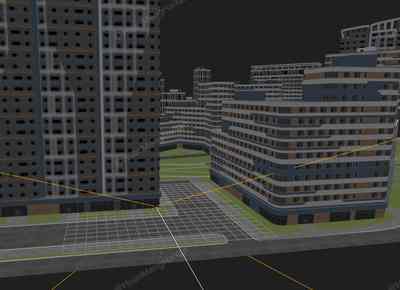
你将学到什么
- glTF/FBX/OBJ 外部模型加载
- 相机交互控制器
- requestAnimationFrame 渲染循环
- GUI 面板调试参数
效果说明
Three.js 关键帧或补间动画。
动画效果 · Three.js
核心概念
Loader 异步加载模型;glTF 返回
gltf.scene,加载后注意scale与坐标系。Draco 需配置DRACOLoader。OrbitControls 轨道旋转缩放;开
enableDamping时每帧需controls.update()。
实现步骤
- 搭建 Scene / Camera / Renderer 与 OrbitControls
- Loader 异步加载模型/纹理资源
- rAF 循环中 update 并 render
代码要点
onResize()— 案例中的独立逻辑模块,建议在线编辑器中跳转阅读autoRun()— 案例中的独立逻辑模块,建议在线编辑器中跳转阅读stopAutoRun()— 案例中的独立逻辑模块,建议在线编辑器中跳转阅读resetEye()— 案例中的独立逻辑模块,建议在线编辑器中跳转阅读eventBinding()— 案例中的独立逻辑模块,建议在线编辑器中跳转阅读onMouseDown()— 案例中的独立逻辑模块,建议在线编辑器中跳转阅读
源码
js
import * as THREE from "three";
import {GLTFLoader} from "three/examples/jsm/loaders/GLTFLoader.js";
import {OrbitControls} from 'three/examples/jsm/controls/OrbitControls.js'
import {DRACOLoader} from "three/examples/jsm/loaders/DRACOLoader.js";
import { PointerLockControls } from "three/examples/jsm/controls/PointerLockControls.js";
import { GUI } from "three/examples/jsm/libs/lil-gui.module.min.js";
import { animate } from "animejs";

let scene, renderer, camera, orbitControls;

let isRoaming = false; // 漫游模式标志

let camera2; // 主要用于动画的相机
const eye1 = new THREE.Object3D();

let pointerlockControls;

// 用于动画的位置/旋转数据对象(animejs 直接修改此对象属性)
const itemData = { px: 0, py: 0, pz: 0, rx: 0, ry: 0, rz: 0 };

window.addEventListener('load', () => {
    init();
    render();
    eventBinding();
});

// 初始化
function init() {
    scene = new THREE.Scene();

    renderer = new THREE.WebGLRenderer({ alpha: true, antialias: true });
    renderer.setSize(window.innerWidth, window.innerHeight);
    renderer.setPixelRatio(window.devicePixelRatio);
    document.body.appendChild(renderer.domElement);

    camera = new THREE.PerspectiveCamera(60, window.innerWidth / window.innerHeight, 0.1, 2000);
    camera.position.set(100, 100, 100);

    orbitControls = new OrbitControls(camera, renderer.domElement);
    orbitControls.enableDamping = true;

    camera2 = new THREE.PerspectiveCamera(75, window.innerWidth / window.innerHeight, 0.1, 2000);
    camera2.position.set(0, 2, 0);

    const cameraHelper = new THREE.CameraHelper(camera2);
    scene.add(cameraHelper);

    // 将相机放置于 eye1 对象中,通过移动 eye1 驱动相机路径
    eye1.add(camera2);
    scene.add(eye1);

    pointerlockControls = new PointerLockControls(camera2, renderer.domElement);

    scene.add(new THREE.AmbientLight(0xffffff, 1));
    scene.add(new THREE.DirectionalLight(0xffffff, 1.5));
    scene.add(new THREE.GridHelper(200, 20));

    const gltfLoader = new GLTFLoader()
    const dracoLoader = new DRACOLoader()
    dracoLoader.setDecoderPath(FILE_HOST + 'js/three/draco/')
    gltfLoader.setDRACOLoader(dracoLoader)
    gltfLoader.load(FILE_HOST + 'models/modern_city.glb', (gltf) => {
        gltf.scene.scale.set(0.03, 0.03, 0.03);
        scene.add(gltf.scene)
    })

    const gui = new GUI();
    const btns = { startRoam: autoRun, stopAutoRun };
    gui.add(btns, 'startRoam').name('开启漫游/巡检');
    gui.add(btns, 'stopAutoRun').name('结束漫游/巡检');
    gui.add(cameraHelper, 'visible').name('相机辅助线');

    window.addEventListener('resize', onResize);
}

// 窗口尺寸变化响应
function onResize() {
    const w = window.innerWidth;
    const h = window.innerHeight;
    renderer.setSize(w, h);
    camera.aspect = w / h;
    camera.updateProjectionMatrix();
    camera2.aspect = w / h;
    camera2.updateProjectionMatrix();
}

// 开启漫游
function autoRun() {
    isRoaming = true;
    orbitControls.enabled = false;

    // 同步 itemData 为 eye1 当前状态,避免重复调用时跳变
    itemData.px = eye1.position.x;
    itemData.py = eye1.position.y;
    itemData.pz = eye1.position.z;
    itemData.rx = eye1.rotation.x;
    itemData.ry = eye1.rotation.y;
    itemData.rz = eye1.rotation.z;

    const a90 = -Math.PI / 2;
    const time1 = 6000; // 直线段时长
    const time2 = 6000; // 等待转弯时长
    const time3 = 1200; // 转弯时长

    // 巡检路径:沿城市街道绕行一圈(坐标根据城市模型缩放后的街道位置设定)
    animate(itemData, {
        px: [
            { to: 0,   duration: time1 },
            { to: 30,  duration: time1, delay: time3 },
            { to: 30,  duration: time1, delay: time3 },
            { to: 0,   duration: time1, delay: time3 }
        ],
        pz: [
            { to: -30, duration: time1 },
            { to: -30, duration: time1, delay: time3 },
            { to: 0,   duration: time1, delay: time3 },
            { to: 0,   duration: time1, delay: time3 }
        ],
        ry: [
            { to: a90,     duration: time3, delay: time2 },
// ... 完整源码见在线案例编辑器
小结
动画效果 · Three.js