
卷曲动画
Curl Animate
你将学到什么
- 相机交互控制器
- 实时阴影 ShadowMap
- 天空盒与环境贴图
- requestAnimationFrame 渲染循环
- Clock 帧间隔计时
效果说明
Three.js 关键帧或补间动画。
动画效果 · Three.js
核心概念
OrbitControls 轨道旋转缩放;开
enableDamping时每帧需controls.update()。阴影四步:
renderer.shadowMap.enabled、光源castShadow、物体castShadow、地面receiveShadow。CubeTexture 六面贴图作
scene.background;scene.environment供 PBR 材质反射。
实现步骤
- 搭建 Scene / Camera / Renderer 与 OrbitControls
- rAF 循环中 update 并 render
代码要点
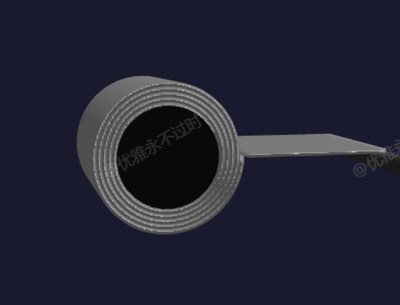
buildStripGeometry()— 案例中的独立逻辑模块,建议在线编辑器中跳转阅读updateStrip()— 案例中的独立逻辑模块,建议在线编辑器中跳转阅读
源码
js
import * as THREE from 'three'
import { OrbitControls } from 'three/examples/jsm/controls/OrbitControls.js'
import { GUI } from 'dat.gui'

const box = document.getElementById('box')
const scene = new THREE.Scene()
scene.background = new THREE.Color(0x1a1a2e)

const camera = new THREE.PerspectiveCamera(50, box.clientWidth / box.clientHeight, 0.1, 1000)
camera.position.set(0, 12, 20)

const renderer = new THREE.WebGLRenderer({ antialias: true })
renderer.setSize(box.clientWidth, box.clientHeight)
// renderer.shadowMap.enabled = true
box.appendChild(renderer.domElement)

new OrbitControls(camera, renderer.domElement)

scene.add(new THREE.AmbientLight(0xffffff, 0.8))
const dirLight = new THREE.DirectionalLight(0xffffff, 1.5)
dirLight.position.set(5, 10, 5)
dirLight.castShadow = true
scene.add(dirLight)
scene.add(new THREE.DirectionalLight(0x4488ff, 0.5).position.set(-5, 5, -5))

// 钢带材质
const stripMat = new THREE.MeshStandardMaterial({
    color: 'white',
    metalness: 0.7,
    roughness: 0.15,
    side: THREE.DoubleSide,
    // envMapIntensity: 1.0
})

// 参数
const params = {
    speed: 1.0,
    stripWidth: 4,
    thickness: 0.15,
    coreRadius: 1.5,
    maxTurns: 8,
    feedLength: 12,
    playing: true,
    reset() { totalAngle = 0 }
}

let totalAngle = 0 // 已卷绕的总角度(弧度)
let stripMesh = null

// 构建钢带几何体:水平进料段 + 螺旋卷绕段
function buildStripGeometry(angle, coreRadius, stripThickness, width, feedLen) {
    const segsPerRad = 10
    const coilSegs = Math.max(Math.floor(angle * segsPerRad), 1)
    const feedSegs = 20
    const totalSegs = feedSegs + coilSegs
    const halfW = width / 2
    const halfT = stripThickness / 2

    const positions = []
    const indices = []

    const radiusAt = (a) => coreRadius + (a / (Math.PI * 2)) * stripThickness

    for (let i = 0; i <= totalSegs; i++) {
        let cx, cy, nx, ny

        if (i < feedSegs) {
            // 进料段:水平从右侧远端到卷芯右侧
            const t = 1 - i / feedSegs
            cx = radiusAt(angle) + t * feedLen
            cy = 0
            nx = 0
            ny = 1
        } else {
            // 螺旋段:从最外圈(angle)顺时针卷到最内圈(0)
            // 连续递减角度,同时半径递减,不会穿层
            const t = (i - feedSegs) / coilSegs // 0->1
            const a = angle * (1 - t) // angle->0 递减
            const r = radiusAt(a)
            // 顺时针旋转(负角度)
            const theta = -(angle - a) // 从0度开始顺时针转了多少
            cx = Math.cos(theta) * r
            cy = Math.sin(theta) * r
            nx = Math.cos(theta)
            ny = Math.sin(theta)
        }

        positions.push(cx + nx * halfT, cy + ny * halfT, halfW)
        positions.push(cx + nx * halfT, cy + ny * halfT, -halfW)
        positions.push(cx - nx * halfT, cy - ny * halfT, halfW)
        positions.push(cx - nx * halfT, cy - ny * halfT, -halfW)
    }

    for (let i = 0; i < totalSegs; i++) {
        const base = i * 4
        const next = base + 4
        indices.push(base, next, base + 1, base + 1, next, next + 1)
        indices.push(base + 2, base + 3, next + 2, base + 3, next + 3, next + 2)
        indices.push(base, base + 2, next, next, base + 2, next + 2)
        indices.push(base + 1, next + 1, base + 3, base + 3, next + 1, next + 3)
    }

    indices.push(0, 1, 2, 1, 3, 2)
    const last = totalSegs * 4
    indices.push(last, last + 2, last + 1, last + 1, last + 2, last + 3)

    const geo = new THREE.BufferGeometry()
    geo.setAttribute('position', new THREE.Float32BufferAttribute(positions, 3))
    geo.setIndex(indices)
    geo.computeVertexNormals()
    return geo
}

// 卷芯
const coreMat = new THREE.MeshStandardMaterial({ color: 0x444444, metalness: 0.9, roughness: 0.2 })
const core = new THREE.Mesh(new THREE.CylinderGeometry(params.coreRadius, params.coreRadius, params.stripWidth + 0.2, 32), coreMat)
core.rotation.x = Math.PI / 2
scene.add(core)

// 支撑辊
// ... 完整源码见在线案例编辑器
小结
动画效果 · Three.js