
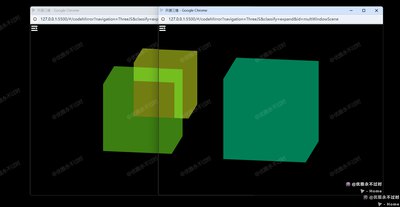
多浏览器窗口连接
Mult Window
你将学到什么
- 天空盒与环境贴图
- 水面 / 反射面效果
- requestAnimationFrame 渲染循环
效果说明
Three.js 接第三方库或扩展能力。入口在 WindowManager。
扩展功能 · Three.js
核心概念
CubeTexture 六面贴图作
scene.background;scene.environment供 PBR 材质反射。Reflector/Water 基于 renderTarget 的平面反射或动态水面法线。
实现步骤
- 搭建 Scene / Camera / Renderer 与 OrbitControls
- rAF 循环中 update 并 render
代码要点
setupScene()— 案例中的独立逻辑模块,建议在线编辑器中跳转阅读setupWindowManager()— 案例中的独立逻辑模块,建议在线编辑器中跳转阅读updateNumberOfCubes()— 案例中的独立逻辑模块,建议在线编辑器中跳转阅读updateWindowShape()— 案例中的独立逻辑模块,建议在线编辑器中跳转阅读resize()— 案例中的独立逻辑模块,建议在线编辑器中跳转阅读
源码
js
import * as THREE from 'three'

confirm("是否打开多窗口?")
	?
	window.open(

		HOST + '#/codeMirror?navigation=ThreeJS&classify=expand&id=multWindowScene',

		'_blank',

		`width=800,height=600,left=${Math.random() * 500},top=${Math.random() * 200}`
	) : null

class WindowManager {
	#windows;
	#count = localStorage.getItem("count") || 0;
	#id;
	#winData;
	#winShapeChangeCallback;
	#winChangeCallback;

	constructor() {
		addEventListener("storage", (event) => {
			if (event.key == "windows") {
				let newWindows = JSON.parse(event.newValue);
				let winChange = this.#didWindowsChange(this.#windows, newWindows);
				this.#windows = newWindows;
				if (winChange && this.#winChangeCallback) this.#winChangeCallback();
			}
		});

		window.addEventListener('beforeunload', () => {
			let index = this.getWindowIndexFromId(this.#id);
			this.#windows.splice(index, 1);
			this.updateWindowsLocalStorage();
		});
	}

	#didWindowsChange(pWins, nWins) {
		if (pWins.length != nWins.length) return true;
		return pWins.some((pWin, i) => pWin.id != nWins[i].id);
	}

	init(metaData) {
		this.#windows = JSON.parse(localStorage.getItem("windows")) || [];
		this.#count++;
		this.#id = this.#count;
		let shape = this.getWinShape();
		this.#winData = { id: this.#id, shape: shape, metaData: metaData };
		this.#windows.push(this.#winData);
		localStorage.setItem("count", this.#count);
		this.updateWindowsLocalStorage();
	}

	getWinShape() {
		return { x: window.screenLeft, y: window.screenTop, w: window.innerWidth, h: window.innerHeight };
	}

	getWindowIndexFromId(id) {
		return this.#windows.findIndex(win => win.id == id);
	}

	updateWindowsLocalStorage() {
		localStorage.setItem("windows", JSON.stringify(this.#windows));
	}

	update() {
		let winShape = this.getWinShape();
		if (Object.values(winShape).some((value, i) => value != Object.values(this.#winData.shape)[i])) {
			this.#winData.shape = winShape;
			let index = this.getWindowIndexFromId(this.#id);
			this.#windows[index].shape = winShape;
			if (this.#winShapeChangeCallback) this.#winShapeChangeCallback();
			this.updateWindowsLocalStorage();
		}
	}

	setWinShapeChangeCallback(callback) {
		this.#winShapeChangeCallback = callback;
	}

	setWinChangeCallback(callback) {
		this.#winChangeCallback = callback;
	}

	getWindows() {
		return this.#windows;
	}

	getThisWindowData() {
		return this.#winData;
	}

	getThisWindowID() {
		return this.#id;
	}
}

let camera, scene, renderer, world, near, far, pixR = window.devicePixelRatio || 1, cubes = [], sceneOffsetTarget = { x: 0, y: 0 }, sceneOffset = { x: 0, y: 0 };
let today = new Date().setHours(0, 0, 0, 0), internalTime = (new Date().getTime() - today) / 1000.0, windowManager, initialized = false;

if (new URLSearchParams(window.location.search).get("clear")) localStorage.clear();
else {
	document.addEventListener("visibilitychange", () => { if (document.visibilityState != 'hidden' && !initialized) init(); });
	window.onload = () => { if (document.visibilityState != 'hidden') init(); };

	function init() {
		initialized = true;
		setTimeout(() => { setupScene(); setupWindowManager(); resize(); updateWindowShape(false); render(); window.addEventListener('resize', resize); }, 500)
	}

	function setupScene() {
		camera = new THREE.OrthographicCamera(0, 0, window.innerWidth, window.innerHeight, -10000, 10000);
		camera.position.z = 2.5; near = camera.position.z - .5; far = camera.position.z + 0.5;
		scene = new THREE.Scene(); scene.background = new THREE.Color(0.0); scene.add(camera);
		renderer = new THREE.WebGLRenderer({ antialias: true, depthBuffer: true }); renderer.setPixelRatio(pixR);
		world = new THREE.Object3D(); scene.add(world);
		renderer.domElement.setAttribute("id", "scene"); document.body.appendChild(renderer.domElement);
	}

// ... 完整源码见在线案例编辑器
小结
扩展功能 · Three.js