
gltf/fbx/obj 模型加载
Model Load
你将学到什么
- 三种主流格式 glTF / FBX / OBJ 的加载方式
- DRACOLoader 解码 Draco 压缩的 glTF
- MTLLoader 为 OBJ 绑定材质
- 加载后 scale / position 调整的常见原因
效果说明
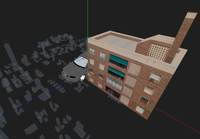
同一场景中同时加载三个模型:
| 模型 | 格式 | 文件 |
|---|---|---|
| 汽车 | glb(Draco 压缩) | car.glb |
| 城市 | FBX | city.FBX |
| 房屋 | OBJ + MTL | house.obj + house.mtl |
环境光照明 + OrbitControls 环绕观察。房屋相对汽车做了 X 轴偏移,避免重叠。
核心概念
格式选型
| 格式 | 推荐度 | 特点 |
|---|---|---|
| glTF / glb | ⭐ 首选 | 现代标准,支持 PBR、动画、Draco 压缩;.glb 为单文件二进制 |
| FBX | 常用 | Autodesk 生态,Blender/3ds Max 导出多;有时需手动调 scale |
| OBJ + MTL | legacy | 仅几何 + 基础材质,无动画;需两个文件 |
生产项目 优先 glTF 2.0,体积和加载效率最佳。
Loader 与返回值
js
// glTF → gltf.scene 是 Group,内含 Mesh、Light 等
GLTFLoader.load(url, (gltf) => {
    scene.add(gltf.scene);
    // gltf.animations, gltf.cameras 亦可用
});

// FBX → 直接是 Object3D
FBXLoader.load(url, (object3d) => {
    scene.add(object3d);
});

// OBJ 需先加载 MTL 材质库
mtlLoader.load(mtlUrl, (mtl) => {
    mtl.preload();
    objLoader.setMaterials(mtl);
    objLoader.load(objUrl, (obj) => scene.add(obj));
});
Draco 几何压缩
Draco 将 mesh 顶点数据压缩,可减小 70%+ 体积,但浏览器需 WASM 解码器:
js
const dracoLoader = new DRACOLoader();
dracoLoader.setDecoderPath('/path/to/draco/');  // 含 draco_decoder.wasm 等
loader.setDRACOLoader(dracoLoader);
解码路径必须指向 three.js 自带的 examples/jsm/libs/draco/ 或 CDN 等价目录。
为什么 FBX 要 scale 0.0005?
不同 DCC 工具(Blender、3ds Max、C4D)导出时 单位制不一致:有的按厘米、有的按米。加载后若模型巨大或极小,用 object3d.scale.set() 修正,或通过 Box3.setFromObject() 计算包围盒后自适应。
js
object3d.scale.set(0.0005, 0.0005, 0.0005);  // city.FBX 单位偏大
obj.position.x += 3;  // 错开多个模型,便于观察
实现步骤
- 搭建 Scene / Camera / Renderer / OrbitControls / rAF
- 添加
AmbientLight+AxesHelper - GLTFLoader + DRACO → 加载
car.glb - FBXLoader → 加载
city.FBX并缩小 - MTLLoader → OBJLoader 链式加载
house
三种加载 互不阻塞,各自异步回调 scene.add。
代码要点
glTF + Draco
js
const loader = new GLTFLoader();
loader.setDRACOLoader(
    new DRACOLoader().setDecoderPath(FILE_HOST + 'js/three/draco/')
);
loader.load(HOST + '/files/model/car.glb', gltf => {
    scene.add(gltf.scene);
});
FBX 缩放
js
new FBXLoader().load(HOST + '/files/model/city.FBX', (object3d) => {
    scene.add(object3d);
    object3d.scale.set(0.0005, 0.0005, 0.0005);
});
OBJ + MTL 链式加载
js
const objLoader = new OBJLoader();
const mtlLoader = new MTLLoader();

mtlLoader.load(FILE_HOST + 'files/model/house/house.mtl', (mtl) => {
    mtl.preload();                    // 预加载贴图
    objLoader.setMaterials(mtl);      // 绑定材质
    objLoader.load(FILE_HOST + 'files/model/house/house.obj', (obj) => {
        scene.add(obj);
        obj.position.x += 3;
    });
});
加载进度
生产环境建议用 loader.load(url, onLoad, onProgress, onError) 第三个参数显示进度条;失败时 onError 捕获网络或格式错误。
源码
js
import * as THREE from 'three'
import { OrbitControls } from 'three/examples/jsm/controls/OrbitControls.js'
import { GLTFLoader } from 'three/examples/jsm/loaders/GLTFLoader.js'
import { DRACOLoader } from 'three/examples/jsm/loaders/DRACOLoader.js'
import { FBXLoader } from 'three/examples/jsm/loaders/FBXLoader.js'
import { OBJLoader } from 'three/examples/jsm/loaders/OBJLoader.js'
import { MTLLoader } from 'three/examples/jsm/loaders/MTLLoader.js'

const box = document.getElementById('box')

const scene = new THREE.Scene()

const camera = new THREE.PerspectiveCamera(75, box.clientWidth / box.clientHeight, 0.1, 1000)
camera.position.set(5, 5, 5)

const renderer = new THREE.WebGLRenderer({ antialias: true, alpha: true, logarithmicDepthBuffer: true })
renderer.setSize(box.clientWidth, box.clientHeight)
box.appendChild(renderer.domElement)

new OrbitControls(camera, renderer.domElement)

window.onresize = () => {
    renderer.setSize(box.clientWidth, box.clientHeight)
    camera.aspect = box.clientWidth / box.clientHeight
    camera.updateProjectionMatrix()
}

animate()

function animate() {
    requestAnimationFrame(animate)
    renderer.render(scene, camera)
}

scene.add(new THREE.AmbientLight(0xffffff, 4))
scene.add(new THREE.AxesHelper(1000))

// glTF / glb + Draco
const loader = new GLTFLoader()
loader.setDRACOLoader(new DRACOLoader().setDecoderPath(FILE_HOST + 'js/three/draco/'))
loader.load(HOST + '/files/model/car.glb', gltf => {
    scene.add(gltf.scene)
})

// FBX
new FBXLoader().load(HOST + '/files/model/city.FBX', (object3d) => {
    scene.add(object3d)
    object3d.scale.set(0.0005, 0.0005, 0.0005)
})

// OBJ + MTL
const objLoader = new OBJLoader()
const mtlLoader = new MTLLoader()
mtlLoader.load(FILE_HOST + 'files/model/house/house.mtl', (mtl) => {
    mtl.preload()
    objLoader.setMaterials(mtl)
    objLoader.load(FILE_HOST + 'files/model/house/house.obj', (obj) => {
        scene.add(obj)
        obj.position.x += 3
    })
})
小结
- glTF 优先;Draco 压缩记得配置
setDecoderPath - FBX/OBJ 加载后常需 scale / position 微调
- OBJ 必须 先 MTL 再 OBJ,否则模型无材质或全白
- 上一篇:人物模型动画 · 下一篇:模型阴影
基础案例 · Three.js · 2/35