
animejs使用
Animejs Basic
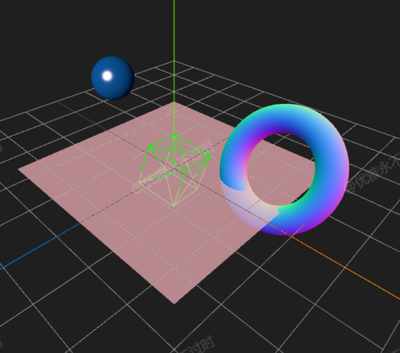
你将学到什么
- 相机交互控制器
- requestAnimationFrame 渲染循环
效果说明
Three.js 关键帧或补间动画。
动画效果 · Three.js
核心概念
- OrbitControls 轨道旋转缩放;开
enableDamping时每帧需controls.update()。
实现步骤
- 搭建 Scene / Camera / Renderer 与 OrbitControls
- rAF 循环中 update 并 render
代码要点
loop()— 案例中的独立逻辑模块,建议在线编辑器中跳转阅读
源码
js
import * as THREE from 'three'
import { OrbitControls } from 'three/examples/jsm/controls/OrbitControls.js'
import { animate } from 'animejs'

const box = document.getElementById('box')

const scene = new THREE.Scene()

const camera = new THREE.PerspectiveCamera(75, box.clientWidth / box.clientHeight, 0.1, 100000)

camera.position.set(50, 50, 50)

const renderer = new THREE.WebGLRenderer({ antialias: true, alpha: true, logarithmicDepthBuffer: true })

renderer.setSize(box.clientWidth, box.clientHeight)

box.appendChild(renderer.domElement)

new OrbitControls(camera, renderer.domElement)

scene.add(new THREE.AxesHelper(100), new THREE.GridHelper(100, 10))

loop()

function loop() {

    requestAnimationFrame(loop)

    renderer.render(scene, camera)

}

window.onresize = () => {

    renderer.setSize(box.clientWidth, box.clientHeight)

    camera.aspect = box.clientWidth / box.clientHeight

    camera.updateProjectionMatrix()

}

/* 制作animate */
const geometry = new THREE.BoxGeometry(10, 10, 10)
const material = new THREE.MeshBasicMaterial({ color: 0x00ff00, wireframe: true })
const cube = new THREE.Mesh(geometry, material)
scene.add(cube)
animate(cube.rotation, {
    x: Math.PI,
    y: Math.PI,
    z: Math.PI,
    duration: 2000,
    loop: true
})

/* 添加球体 */
const sphereGeometry = new THREE.SphereGeometry(5, 32, 32)
const sphereMaterial = new THREE.MeshPhongMaterial({
    color: 0x1E90FF,
    shininess: 100,
    specular: 0xffffff
})
const sphere = new THREE.Mesh(sphereGeometry, sphereMaterial)
sphere.position.set(-20, 10, 0)
scene.add(sphere)

// 添加光源使球体材质效果更好
const light = new THREE.DirectionalLight(0xffffff, 1.0)
light.position.set(10, 20, 30)
scene.add(light)
scene.add(new THREE.AmbientLight(0x404040))

// 球体位置动画
animate(sphere.position, {
    y: [10, 20, 10],
    easing: 'easeInOutQuad',
    duration: 3000,
    loop: true
})

/* 添加环形 */
const torusGeometry = new THREE.TorusGeometry(7, 2, 16, 100)
const torusMaterial = new THREE.MeshNormalMaterial()
const torus = new THREE.Mesh(torusGeometry, torusMaterial)
torus.position.set(20, 5, -10)
scene.add(torus)

// 环形缩放和旋转动画
animate(torus.scale, {
    x: [1, 1.5, 1],
    y: [1, 1.5, 1],
    z: [1, 1.5, 1],
    duration: 2500,
    loop: true
})
animate(torus.rotation, {
    x: Math.PI * 2,
    z: Math.PI * 2,
    duration: 5000,
    loop: true
})

/* 添加平面 */
const planeGeometry = new THREE.PlaneGeometry(50, 50)
const planeMaterial = new THREE.MeshBasicMaterial({
    color: 0xFF6347,
    side: THREE.DoubleSide,
    transparent: true,
    opacity: 0.7
})
const plane = new THREE.Mesh(planeGeometry, planeMaterial)
plane.rotation.x = Math.PI / 2
scene.add(plane)

animate(plane.material.color, {
    r: [1, 0, 1],
    g: [0.5, 0, 0.5],
    b: [0.5, 1, 0.5],
    duration: 4000,
    loop: true
// ... 完整源码见在线案例编辑器
小结
动画效果 · Three.js