
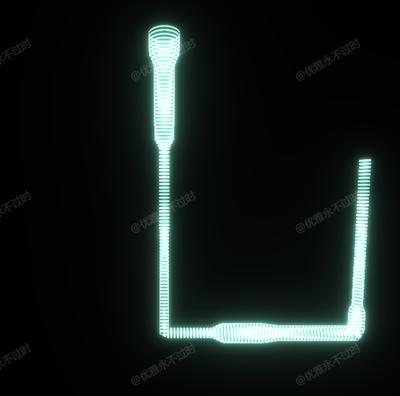
动态管道
Dynamic Tube
你将学到什么
- EffectComposer 后期处理管线
- 相机交互控制器
- 轮廓高亮 OutlinePass
- requestAnimationFrame 渲染循环
效果说明
原场景 + 后期 Pass 叠加。
应用场景 · Three.js
核心概念
EffectComposer 多 Pass 链式渲染:RenderPass → 特效 Pass → 输出屏幕。
composer.render()替代renderer.render()。OrbitControls 轨道旋转缩放;开
enableDamping时每帧需controls.update()。选中物体外轮廓发光,常用于编辑器选中态。
实现步骤
- 搭建 Scene / Camera / Renderer 与 OrbitControls
- EffectComposer 组装 Pass 链并 render
代码要点
createMultiRadiusTube()— 案例中的独立逻辑模块,建议在线编辑器中跳转阅读getRadiusAt()— 案例中的独立逻辑模块,建议在线编辑器中跳转阅读
源码
js
import * as THREE from 'three'
import { OrbitControls } from 'three/examples/jsm/controls/OrbitControls.js'
import { UnrealBloomPass } from 'three/examples/jsm/postprocessing/UnrealBloomPass.js';
import { EffectComposer } from 'three/examples/jsm/postprocessing/EffectComposer.js';
import { RenderPass } from 'three/examples/jsm/postprocessing/RenderPass.js';

const box = document.getElementById('box')

const scene = new THREE.Scene()

const camera = new THREE.PerspectiveCamera(75, box.clientWidth / box.clientHeight, 0.1, 100000)
camera.position.set(0, 30, 60)
const renderer = new THREE.WebGLRenderer({ antialias: true, alpha: true, logarithmicDepthBuffer: true })
renderer.setSize(box.clientWidth, box.clientHeight)
box.appendChild(renderer.domElement)
const controls = new OrbitControls(camera, renderer.domElement)
controls.target.set(0, 25, 0)
controls.update()

const effectComposer = new EffectComposer(renderer);
const renderPass = new RenderPass(scene, camera);
effectComposer.addPass(renderPass);
const bloomPass = new UnrealBloomPass(new THREE.Vector2(box.clientWidth, box.clientHeight), 0.8, 0.2, 0.0);
effectComposer.addPass(bloomPass);

const axes = new THREE.AxesHelper(16)
// scene.add(axes)

const controlPoints = [
    { point: new THREE.Vector3(0, 60, 0), radius: 3 },
    { point: new THREE.Vector3(0, 56, 0), radius: 3 },
    { point: new THREE.Vector3(0, 54, 0), radius: 2 },
    { point: new THREE.Vector3(0, 40, 0), radius: 2 },
    { point: new THREE.Vector3(0, 38, 0), radius: 1 },
    { point: new THREE.Vector3(0, 0, 0), radius: 1 },
    { point: new THREE.Vector3(0, 0, 0), radius: 1 },
    { point: new THREE.Vector3(10, 0, 0), radius: 1 },
    { point: new THREE.Vector3(12, 0, 0), radius: 2 },
    { point: new THREE.Vector3(20, 0, 0), radius: 2 },
    { point: new THREE.Vector3(24, 0, 0), radius: 1.5 },
    { point: new THREE.Vector3(40, 0, 0), radius: 1.5 },
    { point: new THREE.Vector3(40, 0, 0), radius: 1.5 },
    { point: new THREE.Vector3(40, 5, 0), radius: 1.5 },
    { point: new THREE.Vector3(40, 6, 0), radius: 1 },
    { point: new THREE.Vector3(40, 36, 0), radius: 1 },
]

// 提取点位创建曲线
const curvePoints = controlPoints.map(cp => cp.point)
const curve1 = new THREE.CatmullRomCurve3(curvePoints)

// 提取半径数组
const radiusArray = controlPoints.map(cp => cp.radius)

function createMultiRadiusTube(curve, tubularSegments, radiusArr, radialSegments, closed, controlPoints) {
    const frames = curve.computeFrenetFrames(tubularSegments, closed);
    const vertices = [];
    const normals = [];
    const uvs = [];
    const indices = [];

    // 计算每个控制点在曲线上的实际 t 值(基于弧长)
    const numPoints = controlPoints.length;

    // 计算相邻控制点之间的距离
    const segmentLengths = [];
    let totalLength = 0;
    for (let i = 0; i < numPoints - 1; i++) {
        const len = controlPoints[i].point.distanceTo(controlPoints[i + 1].point);
        segmentLengths.push(len);
        totalLength += len;
    }

    // 计算每个控制点的累积弧长比例作为 t 值
    const controlPointTs = [0]; // 第一个点 t = 0
    let accumulatedLength = 0;
    for (let i = 0; i < segmentLengths.length; i++) {
        accumulatedLength += segmentLengths[i];
        controlPointTs.push(accumulatedLength / totalLength);
    }

    // 根据曲线 t 值获取对应的半径(基于控制点的 t 值进行插值)
    function getRadiusAt(t) {
        // 找到 t 所在的控制点区间
        for (let i = 0; i < controlPointTs.length - 1; i++) {
            const t0 = controlPointTs[i];
            const t1 = controlPointTs[i + 1];

            if (t >= t0 && t <= t1) {
                // 在这个区间内进行线性插值
                const fraction = (t - t0) / (t1 - t0);
                return radiusArr[i] + (radiusArr[i + 1] - radiusArr[i]) * fraction;
            }
        }

        // 边界情况
        if (t <= controlPointTs[0]) return radiusArr[0];
        return radiusArr[radiusArr.length - 1];
    }

    for (let i = 0; i <= tubularSegments; i++) {
        const t = i / tubularSegments;
        const position = curve.getPointAt(t);
        const N = frames.normals[i];
        const B = frames.binormals[i];

        // 通过线性插值获取当前位置的半径
        const radius = getRadiusAt(t);

        for (let j = 0; j <= radialSegments; j++) {
            const v = j / radialSegments * Math.PI * 2;
            const sin = Math.sin(v);
            const cos = -Math.cos(v);

            const normal = new THREE.Vector3(
                cos * N.x + sin * B.x,
                cos * N.y + sin * B.y,
                cos * N.z + sin * B.z
            ).normalize();

// ... 完整源码见在线案例编辑器
小结
应用场景 · Three.js