
官方点聚合
Official Point Cluster
你将学到什么
- CustomDataSource + Entity.point 管理点集
- dataSource.clustering 开箱聚合
- clusterEvent 自定义聚合 billboard 样式
- Canvas 缓存不同数量的簇图标
效果说明
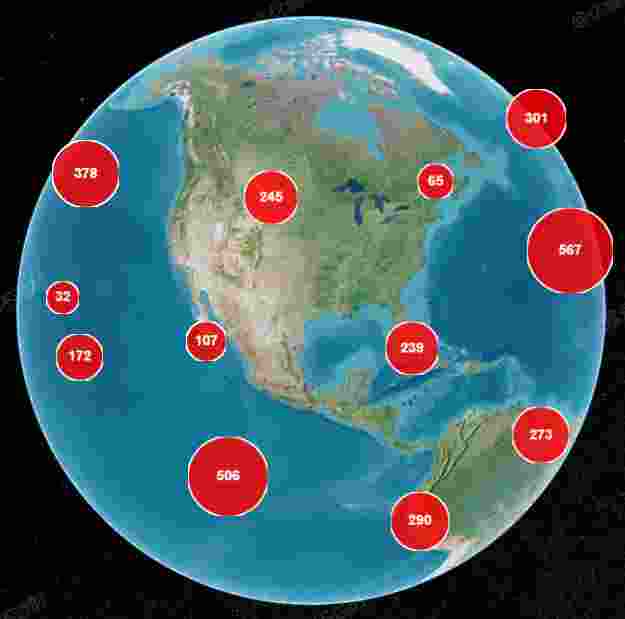
随机 10000 个黄点分布全球;缩小时自动聚成带数字的圆形图标,数量越多圆越大。
核心概念
启用聚合
js
const dataSource = new Cesium.CustomDataSource('points');
viewer.dataSources.add(dataSource);

// 循环 entities.add({ position, point: { pixelSize, color } })

const clustering = dataSource.clustering;
clustering.enabled = true;
clustering.pixelRange = 100;      // 屏幕像素距离内合并
clustering.minimumClusterSize = 3;  // 至少 3 点才聚合
clusterEvent 自定义样式
js
clustering.clusterEvent.addEventListener((clusteredEntities, cluster) => {
    cluster.label.show = false;
    cluster.billboard.show = true;
    cluster.billboard.verticalOrigin = Cesium.VerticalOrigin.BOTTOM;
    const count = clusteredEntities.length;
    cluster.billboard.image = cache[count] || createClusterCanvas(size, count);
});
Cesium 自动维护簇 Entity;你只需改 cluster.billboard / cluster.label。
与 Supercluster 对比
| 官方 clustering | Supercluster | |
|---|---|---|
| 依赖 | 无 | 外部库 |
| 数据层 | Entity | 自行转 Billboard |
| 自定义 | clusterEvent | 完全自控 |
实现步骤
- CustomDataSource add 10000 随机 Entity
- 配置 clustering 三参数
- clusterEvent 里 Canvas 画圆 + 数字,cache 按 count 复用
- 隐藏默认 label,显示自定义 billboard
代码要点
js
const size = Math.min(100, 30 + count / 10);
img = createClusterCanvas(size, count);
cache[count] = img;
cluster.billboard.image = img;
源码
完整源码见 GitHub。
小结
基础功能 · Cesium.js · 18/19