
第一人称房屋
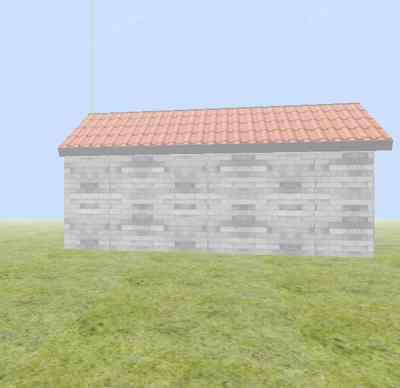
House Scene
你将学到什么
- glTF/FBX/OBJ 外部模型加载
- requestAnimationFrame 渲染循环
- Clock 帧间隔计时
效果说明
Three.js 业务向场景组合。
应用场景 · Three.js
核心概念
- Loader 异步加载模型;glTF 返回
gltf.scene,加载后注意scale与坐标系。Draco 需配置DRACOLoader。
实现步骤
- 搭建 Scene / Camera / Renderer 与 OrbitControls
- Loader 异步加载模型/纹理资源
- rAF 循环中 update 并 render
代码要点
create()— 案例中的独立逻辑模块,建议在线编辑器中跳转阅读createHouse()— 案例中的独立逻辑模块,建议在线编辑器中跳转阅读createGrass()— 案例中的独立逻辑模块,建议在线编辑器中跳转阅读createFloor()— 案例中的独立逻辑模块,建议在线编辑器中跳转阅读createSideWall()— 案例中的独立逻辑模块,建议在线编辑器中跳转阅读createFrontWall()— 案例中的独立逻辑模块,建议在线编辑器中跳转阅读
源码
js
import * as THREE from 'three';
import { FBXLoader } from 'three/examples/jsm/loaders/FBXLoader.js';
import { FirstPersonControls } from 'three/examples/jsm/controls/FirstPersonControls.js';

const host = FILE_HOST + 'examples/flowerAndHouse';

const box = document.getElementById('box');

const width = box.clientWidth;
const height = box.clientHeight;
const camera = new THREE.PerspectiveCamera(60, width / height, 0.1, 1000);

const scene = new THREE.Scene();

const house = new THREE.Group();

const renderer = new THREE.WebGLRenderer();

function create() {
    renderer.setSize(width, height);
    //设置背景颜色
    renderer.setClearColor(0xcce0ff, 1);
    box.appendChild(renderer.domElement);

    camera.position.set(-500, 60, 0)
    camera.lookAt(scene.position);

    const light = new THREE.AmbientLight(0xCCCCCC);
    scene.add(light);

    const axisHelper = new THREE.AxesHelper(1000);
    scene.add(axisHelper);

    createGrass();

    createHouse();

    function createHouse() {
        createFloor();

        const sideWall = createSideWall();
        const sideWall2 = createSideWall();
        sideWall2.position.z = 300;

        createFrontWall();
        createBackWall();

        const roof = createRoof();
        const roof2 = createRoof();
        roof2.rotation.x = Math.PI / 2;
        roof2.rotation.y = Math.PI / 4 * 0.6;
        roof2.position.y = 130;
        roof2.position.x = -50;
        roof2.position.z = 155;

        createWindow();
        createDoor();

        createBed();
    }

    scene.add(house);

    scene.fog = new THREE.Fog(0xffffff, 10, 1500);
}

function createGrass() {
    const geometry = new THREE.PlaneGeometry( 10000, 10000);

    const texture = new THREE.TextureLoader().load(host+'/img/grass.jpg');
    texture.wrapS = THREE.RepeatWrapping;
    texture.wrapT = THREE.RepeatWrapping;
    texture.repeat.set( 100, 100 );

    const grassMaterial = new THREE.MeshBasicMaterial({map: texture});

    const grass = new THREE.Mesh( geometry, grassMaterial );

    grass.rotation.x = -0.5 * Math.PI;

    scene.add( grass );
}

function createFloor() {
    const geometry = new THREE.PlaneGeometry( 200, 300);

    const texture = new THREE.TextureLoader().load(host + '/img/wood.jpg');
    texture.wrapS = THREE.RepeatWrapping;
    texture.wrapT = THREE.RepeatWrapping;
    texture.repeat.set( 2, 2 );

    const material = new THREE.MeshBasicMaterial({map: texture});

    const floor = new THREE.Mesh( geometry, material );

    floor.rotation.x = -0.5 * Math.PI;
    floor.position.y = 1;
    floor.position.z = 150;

    house.add(floor);
}

function createSideWall() {
    const shape = new THREE.Shape();
    shape.moveTo(-100, 0);
    shape.lineTo(100, 0);
    shape.lineTo(100,100);
    shape.lineTo(0,150);
    shape.lineTo(-100,100);
    shape.lineTo(-100,0);

    const extrudeGeometry = new THREE.ExtrudeGeometry( shape );

    const texture = new THREE.TextureLoader().load(host+'/img/wall.jpg');
    texture.wrapS = texture.wrapT = THREE.RepeatWrapping;
    texture.repeat.set( 0.01, 0.005 );

    var material = new THREE.MeshBasicMaterial( {map: texture} );

    const sideWall = new THREE.Mesh( extrudeGeometry, material ) ;
// ... 完整源码见在线案例编辑器
小结
应用场景 · Three.js