
城市混合Shader
CityMixShader
你将学到什么
- Scene / Camera / Renderer 渲染管线
- 相机交互控制器
- 外部模型 / 3D Tiles 加载
- onBeforeCompile 修改内置材质 shader
- GUI 参数调试面板
效果说明
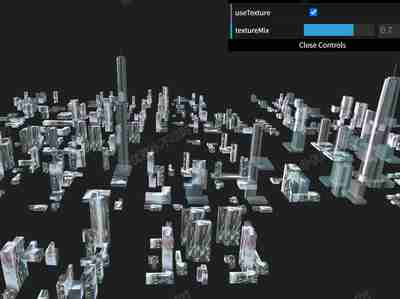
Three.js WebGL 场景,加载外部模型,以自定义 shader 呈现核心视觉效果,技术点:顶点着色器、片元着色器、uniform 驱动。打开在线案例可查看最终画面。
核心概念
- Scene 容纳对象,Camera 定义视点,WebGLRenderer 输出 canvas。
- OrbitControls 轨道旋转缩放;开启阻尼时每帧
controls.update()。 - 异步 Loader 返回 scene 或 tileset;注意 scale、坐标系与
modelMatrix贴地。 - 替换
#include <begin_vertex>等 chunk 注入特效,适合 PBR 材质叠加大屏效果。 - dat.GUI / lil-gui 绑定 uniform 或配置对象实时调参。
实现步骤
- 初始化 Viewer 或 Scene / Camera / Renderer
- 创建 OrbitControls 并处理 resize
- Loader 加载资源并加入 scene / entities / primitives
- material.onBeforeCompile 注入 GLSL 与 uniform
- gui.add 绑定可调参数
代码要点
js
const scene = new THREE.Scene()

const camera = new THREE.PerspectiveCamera(75, box.clientWidth / box.clientHeight, 0.1, 100000)

camera.position.set(150, 150, -700)

const renderer = new THREE.WebGLRenderer({ antialias: true, alpha: true, logarithmicDepthBuffer: true })


const camera = new THREE.PerspectiveCamera(75, box.clientWidth / box.clientHeight, 0.1, 100000)

camera.position.set(150, 150, -700)

const renderer = new THREE.WebGLRenderer({ antialias: true, alpha: true, logarithmicDepthBuffer: true })

renderer.setSize(box.clientWidth, box.clientHeight)


const renderer = new THREE.WebGLRenderer({ antialias: true, alpha: true, logarithmicDepthBuffer: true })

renderer.setSize(box.clientWidth, box.clientHeight)

renderer.setClearColor(0x000000, 0)

renderer.setPixelRatio(window.devicePixelRatio * 2)完整源码:GitHub
小结
着色器 · Three.js · 14/89