
渐变三角形
Gradient Triangle
你将学到什么
- 单三角形 三色顶点 在面内自动插值
setAttribute('color')+vertexColors: truesetIndex用 3 顶点 + 索引绘制
效果说明
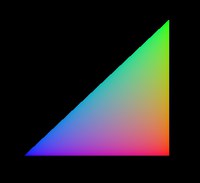
一个三角形,三个顶点分别为 红、绿、蓝,面内呈现平滑 RGB 渐变(GPU 重心插值)。
核心概念
与 顶点颜色入门 相同原理,本案例简化为 1 三角面 + index:
js
geometry.setAttribute('position', new THREE.BufferAttribute(vertices, 3));
geometry.setAttribute('color', colorAttribute);
geometry.setIndex([0, 1, 2]);

new THREE.MeshBasicMaterial({ vertexColors: true, side: THREE.DoubleSide });| 顶点 | 位置 | 颜色 |
|---|---|---|
| 0 | (0,0,0) | 红 |
| 1 | (0,200,0) | 绿 |
| 2 | (200,0,0) | 蓝 |
源码
js
import * as THREE from 'three'
import { OrbitControls } from 'three/examples/jsm/controls/OrbitControls.js'

const box = document.getElementById('box')
const scene = new THREE.Scene()
const camera = new THREE.PerspectiveCamera(75, box.clientWidth / box.clientHeight, 0.1, 1000)
camera.position.set(0, 0, 500)

const renderer = new THREE.WebGLRenderer()
renderer.setSize(box.clientWidth, box.clientHeight)
box.appendChild(renderer.domElement)
new OrbitControls(camera, renderer.domElement)

const geometry = new THREE.BufferGeometry()
geometry.setAttribute('position', new THREE.BufferAttribute(new Float32Array([
    0, 0, 0,  0, 200, 0,  200, 0, 0
]), 3))
geometry.setAttribute('color', new THREE.BufferAttribute(new Float32Array([
    1,0,0,  0,1,0,  0,0,1
]), 3))
geometry.setIndex([0, 1, 2])

const mesh = new THREE.Mesh(
    geometry,
    new THREE.MeshBasicMaterial({ vertexColors: true, side: THREE.DoubleSide })
)
scene.add(mesh)

function animate() {
    requestAnimationFrame(animate)
    renderer.render(scene, camera)
}
animate()
小结
基础案例 · Three.js · 13/35