
场景雾化
Scene Fog
你将学到什么
- Fog(线性雾) 与 FogExp2(指数雾) 的区别
scene.fog与renderer.setClearColor颜色一致的重要性- 远距离物体如何被雾 自然隐没
效果说明
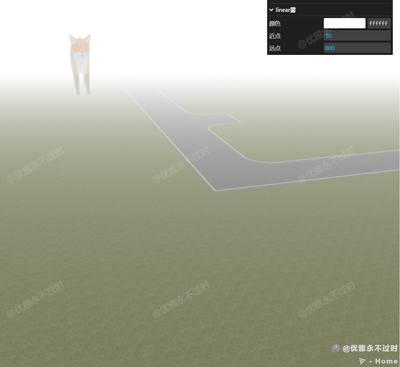
场景中有一只 Fox 模型(z = -500,很远)和一块 放大的地面(较近)。开启雾后,远处狐狸逐渐 融入雾色 看不见,近处地面清晰。GUI 可切换:
- 雾类型:linear / exp2
- 启用/关闭雾
- 雾颜色、near/far(线性)或 density(指数)
核心概念
雾如何工作?
雾在 片元着色阶段 根据像素到相机的距离,将物体颜色 向雾色混合:
最终颜色 = mix(物体颜色, 雾色, fogFactor)| 类型 | 构造函数 | fogFactor 依据 |
|---|---|---|
| Fog 线性雾 | new THREE.Fog(color, near, far) | near 内无雾,far 外全雾,之间线性 |
| FogExp2 指数雾 | new THREE.FogExp2(color, density) | 距离越远指数增长,更自然 |
js
// 线性雾:10~800 单位之间渐变
scene.fog = new THREE.Fog(0xffffff, 10, 800);

// 指数雾:density 越大雾越浓
scene.fog = new THREE.FogExp2(0xffffff, 0.005);
背景色必须匹配
js
renderer.setClearColor(fogColor);
scene.fog = new THREE.Fog(fogColor, near, far);
若 setClearColor 与 fog.color 不一致,地平线会出现 明显色差接缝。
本案例场景布局
js
// 狐狸在很远的 -Z
gltf.scene.position.set(0, 0, -500);

// 地面放大 10 倍,偏移到相机前方
model.scale.set(10, 10, 10);
model.position.z += 60;
model.position.x -= 200;
far = 800 时,狐狸距相机约 500+,已在雾区边缘,适合演示「远物消失」。
logarithmicDepthBuffer
本案例 Renderer 开了 logarithmicDepthBuffer: true,大 near/far 跨度(0.1 ~ 100000)时减轻 Z-fighting,与雾效配合展示大场景。
实现步骤
- Scene + 相机远裁剪
far: 100000+ 灯光 - 加载远距 Fox + 近距地面 glb
getFog(type, color)工厂函数创建两种雾- GUI 切换 type / enable,动态
setFogFolder重建参数面板 - 改雾色时同步
renderer.setClearColor
代码要点
js
function getFog(type, color) {
    renderer.setClearColor(color || 0xffffff);
    if (type === 'linear')
        return new THREE.Fog(color || 0xffffff, 10, 800);
    else
        return new THREE.FogExp2(color || 0xffffff, 0.005);
}

folder.add(fogOption, 'enable').onChange((v) => {
    scene.fog = v ? getFog(fogOption.type) : null;
});关闭雾:scene.fog = null,物体恢复全距可见。
源码
js
import * as THREE from 'three'
import { OrbitControls } from 'three/examples/jsm/controls/OrbitControls.js'
import { GLTFLoader } from 'three/examples/jsm/loaders/GLTFLoader.js'
import { GUI } from 'three/addons/libs/lil-gui.module.min.js'

const box = document.getElementById('box')
const scene = new THREE.Scene()

const camera = new THREE.PerspectiveCamera(50, box.clientWidth / box.clientHeight, 0.1, 100000)
camera.position.set(0, 20, 60)

const renderer = new THREE.WebGLRenderer({ antialias: true, alpha: true, logarithmicDepthBuffer: true })
renderer.setSize(box.clientWidth, box.clientHeight)
box.appendChild(renderer.domElement)

const controls = new OrbitControls(camera, renderer.domElement)
controls.enableDamping = true

scene.add(new THREE.AmbientLight(0xffffff, 1))
const directionalLight = new THREE.DirectionalLight(0xffffff, 1)
directionalLight.position.set(0, 100, 0)
scene.add(directionalLight)

new GLTFLoader().load(GLOBAL_CONFIG.getFileUrl('files/model/Fox.glb'), (gltf) => {
    gltf.scene.position.set(0, 0, -500)
    scene.add(gltf.scene)
})

new GLTFLoader().load(GLOBAL_CONFIG.getFileUrl('models/glb/foorGround.glb'), (gltf) => {
    const model = gltf.scene
    model.position.z += 60
    model.position.x -= 200
    model.scale.set(10, 10, 10)
    scene.add(model)
})

function getFog(type, color) {
    renderer.setClearColor(color || 0xffffff)
    if (type === 'linear') return new THREE.Fog(color || 0xffffff, 10, 800)
    else return new THREE.FogExp2(color || 0xffffff, 0.005)
}

const folder = new GUI()
let fogFolder = null
const fogOption = { type: 'linear', enable: false }

folder.add(fogOption, 'type', ['linear', 'exp2']).name('雾类型').onChange((v) => {
    scene.fog = getFog(v, scene.fog?.color)
    setFogFolder(v)
})
folder.add(fogOption, 'enable').name('启用雾').onChange((v) => {
    if (v) scene.fog = getFog(fogOption.type)
    else scene.fog = null
    setFogFolder(fogOption.type)
})

function setFogFolder(type) {
    if (fogFolder) { fogFolder.destroy?.(); fogFolder = null }
    if (!scene.fog) return
    fogFolder = folder.addFolder(type + '雾')
    fogFolder.addColor(scene.fog, 'color').name('颜色').onChange((v) => renderer.setClearColor(v))
    if (type === 'linear') {
        fogFolder.add(scene.fog, 'near').name('近点')
        fogFolder.add(scene.fog, 'far').name('远点')
    } else {
        fogFolder.add(scene.fog, 'density').name('密度').min(0).max(0.1).step(0.00001)
    }
}

animate()
function animate() {
    requestAnimationFrame(animate)
    controls.update()
    renderer.render(scene, camera)
}

window.onresize = () => {
    renderer.setSize(box.clientWidth, box.clientHeight)
    camera.aspect = box.clientWidth / box.clientHeight
    camera.updateProjectionMatrix()
}
小结
- 线性雾用 near/far 控制范围;指数雾用 density,远景更自然
- 雾色 = 背景色,地平线才干净
- 上一篇:模型天空 · 下一篇:Opt解压 gltf
基础案例 · Three.js · 8/35