
绘制面
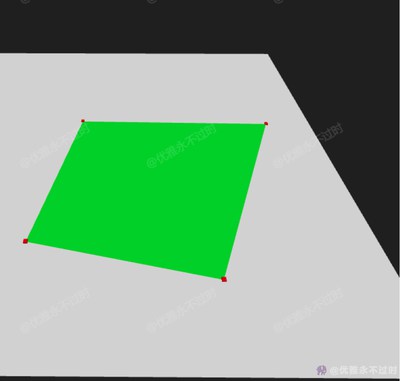
Draw Face
你将学到什么
- 相机交互控制器
- requestAnimationFrame 渲染循环
效果说明
Three.js 业务向场景组合。
应用场景 · Three.js
核心概念
- OrbitControls 轨道旋转缩放;开
enableDamping时每帧需controls.update()。
实现步骤
- 搭建 Scene / Camera / Renderer 与 OrbitControls
- rAF 循环中 update 并 render
代码要点
multShapeGroup()— 案例中的独立逻辑模块,建议在线编辑器中跳转阅读multShapePlaneGeometry()— 案例中的独立逻辑模块,建议在线编辑器中跳转阅读updateMultShapePlaneGeometry()— 案例中的独立逻辑模块,建议在线编辑器中跳转阅读
源码
js
import * as THREE from 'three'
import { OrbitControls } from 'three/examples/jsm/controls/OrbitControls.js'

const box = document.getElementById('box')

const scene = new THREE.Scene()

const camera = new THREE.PerspectiveCamera(75, box.clientWidth / box.clientHeight, 0.1, 1000)

camera.position.set(0, 3, 3)

const renderer = new THREE.WebGLRenderer({ antialias: true, alpha: true, logarithmicDepthBuffer: true })

renderer.setSize(box.clientWidth, box.clientHeight)

box.appendChild(renderer.domElement)

const controls = new OrbitControls(camera, renderer.domElement)

controls.enableDamping = true

const directionalLight = new THREE.DirectionalLight(0xffffff, 1)

directionalLight.position.set(0, 20, 0)

scene.add(directionalLight, new THREE.AmbientLight(0xffffff, 1))

/* 增加一个面 */
const plane = new THREE.PlaneGeometry(5, 5)

const material = new THREE.MeshStandardMaterial({ color: 0xffffff })

const planeMesh = new THREE.Mesh(plane, material)

planeMesh.rotation.x -= Math.PI / 2

scene.add(planeMesh)

animate()

function animate() {

  requestAnimationFrame(animate)

  controls.update()

  renderer.render(scene, camera)

}

window.onresize = () => {

  renderer.setSize(box.clientWidth, box.clientHeight)

  camera.aspect = box.clientWidth / box.clientHeight

  camera.updateProjectionMatrix()

}

// 事件
const raycaster = new THREE.Raycaster()

const getPoint = event => {

  const mouse = new THREE.Vector2(

    (event.offsetX / event.target.clientWidth) * 2 - 1,

    -(event.offsetY / event.target.clientHeight) * 2 + 1

  )

  raycaster.setFromCamera(mouse, camera)

  const intersects = raycaster.intersectObjects(scene.children)

  if (intersects.length > 0) return intersects[0].point

}

const setPointBox = point => {

  const box = new THREE.BoxGeometry(0.04, 0.04, 0.04)

  const material = new THREE.MeshStandardMaterial({ color: 0xff0000 })

  const boxMesh = new THREE.Mesh(box, material)

  boxMesh.position.copy(point)

  scene.add(boxMesh)

}

/* 开始绘制 */
const pointList = []; let drawMesh = null; let stop = false

box.addEventListener('contextmenu', () => {

  stop = true

  const { indexGroup, faceGroup, uvGroup } = multShapeGroup(pointList)

  if (drawMesh) updateMultShapePlaneGeometry(drawMesh.geometry, faceGroup, indexGroup, uvGroup)

})

// 移动
box.addEventListener('mousemove', (event) => {

  if (stop) return

  const point = getPoint(event)

  if (!point || !drawMesh || pointList.length < 2) return

  const { indexGroup, faceGroup, uvGroup } = multShapeGroup([...pointList, point])

  updateMultShapePlaneGeometry(drawMesh.geometry, faceGroup, indexGroup, uvGroup)
// ... 完整源码见在线案例编辑器
小结
应用场景 · Three.js