
人物模型动画案例
Model Animation
你将学到什么
- glTF 模型中的 骨骼动画(Skeletal Animation) 如何播放
AnimationMixer+AnimationAction的核心 API- crossFadeTo 实现待机 / 行走 / 跑步之间的平滑过渡
- 用 lil-gui 面板调试权重、暂停、单步播放
效果说明
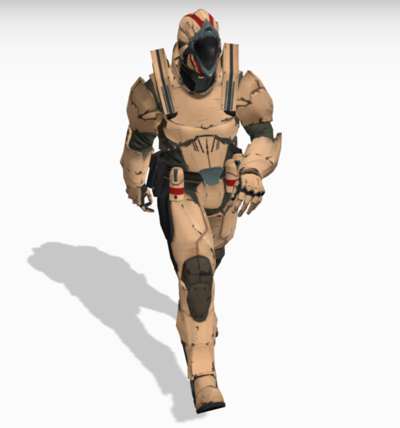
加载 Soldier.glb 士兵模型,在灰色地面上展示 待机、行走、跑步 三套动作。右侧 GUI 面板可:
- 切换显示模型 / 骨骼辅助线
- 暂停、单步推进动画
- 一键 crossFade 切换动作(如「从待机到行走」)
- 手动调节各动作 混合权重 与全局 timeScale
相机通过 OrbitControls 环绕人物,并自动跟随模型位置。
核心概念
glTF 动画数据结构
glTF 加载完成后,gltf.animations 是一个 AnimationClip 数组,每个 clip 包含一组关键帧轨道(位置、旋转、缩放或骨骼矩阵):
js
loader.load(url, (gltf) => {
    model = gltf.scene;
    const animations = gltf.animations;  // [clip0, clip1, clip2, ...]
});
本案例中 clip 索引对应关系(以 Soldier.glb 为准):
| 索引 | 动作 |
|---|---|
animations[0] | idle 待机 |
animations[1] | run 跑步 |
animations[3] | walk 行走 |
TIP
不同模型的 clip 顺序不同,加载后应 console.log(animations.map(a => a.name)) 确认。
AnimationMixer 播放管线
AnimationClip  →  mixer.clipAction(clip)  →  AnimationAction
                                                    ↓
                                            action.play() / crossFadeTo()
                                                    ↓
                              每帧 mixer.update(delta)  →  更新骨骼矩阵  →  模型动起来
js
mixer = new THREE.AnimationMixer(model);
idleAction = mixer.clipAction(animations[0]);
idleAction.play();

// 渲染循环中
mixer.update(clock.getDelta());
crossFadeTo 过渡
两个动作同时播放,通过 权重渐变 实现无缝切换:
js
setWeight(endAction, 1);
endAction.time = 0;
startAction.crossFadeTo(endAction, duration, true);
//                              过渡时长(秒)  是否同步时间轴
setEffectiveWeight(weight) 控制每个 action 的贡献比例;三个 action 同时 play() 时,权重之和通常为 1。
SkeletonHelper
js
skeleton = new THREE.SkeletonHelper(model);
skeleton.visible = false;  // GUI 可切换显示
用于调试骨骼层级与关节方向,上线前隐藏即可。
实现步骤
- init — Scene、Camera、Renderer、阴影、地面、灯光
- GLTFLoader 加载 Soldier.glb →
scene.add(model) - 创建
AnimationMixer,绑定 idle / walk / run 三个clipAction - createPanel — lil-gui 六组控制项
renderer.setAnimationLoop(animate)替代手写 rAF- animate —
mixer.update(delta)+ 相机跟随 + OrbitControls
代码要点
阴影与地面
js
dirLight.castShadow = true;
renderer.shadowMap.enabled = true;

model.traverse(obj => { if (obj.isMesh) obj.castShadow = true; });

const ground = new THREE.Mesh(
    new THREE.PlaneGeometry(100, 100),
    new THREE.MeshPhongMaterial({ color: 0xcbcbcb, depthWrite: false })
);
ground.rotation.x = -Math.PI / 2;
ground.receiveShadow = true;
相机跟随人物
js
cameraTarget.copy(model.position);
cameraTarget.y += 1;
controls.target.copy(cameraTarget);
controls.update();
单步调试模式
js
if (singleStepMode) {
    mixerUpdateDelta = sizeOfNextStep;  // 固定步长,非真实 delta
    sizeOfNextStep = 0;
}
mixer.update(mixerUpdateDelta);
适合逐帧检查动画衔接是否穿帮。
源码
js
import * as THREE from "three";
import Stats from "three/examples/jsm/libs/stats.module.js";
import { GUI } from "three/examples/jsm/libs/lil-gui.module.min.js";
import { GLTFLoader } from "three/examples/jsm/loaders/GLTFLoader.js";
import { OrbitControls } from 'three/examples/jsm/controls/OrbitControls.js'

let scene, renderer, camera, stats;
let model, skeleton, mixer, clock;
const crossFadeControls = [];
let idleAction, walkAction, runAction;
let idleWeight, walkWeight, runWeight;
let actions, settings;
let singleStepMode = false;
let sizeOfNextStep = 0;
let controls;
let cameraTarget = new THREE.Vector3();

init();

function init() {
  const container = document.getElementById("box");

  camera = new THREE.PerspectiveCamera(45, window.innerWidth / window.innerHeight, 1, 100);
  camera.position.set(1, 2, -3);
  camera.lookAt(0, 1, 0);

  clock = new THREE.Clock();
  scene = new THREE.Scene();
  scene.background = new THREE.Color(0xa0a0a0);
  scene.fog = new THREE.Fog(0xa0a0a0, 10, 50);

  const hemiLight = new THREE.HemisphereLight(0xffffff, 0x8d8d8d, 3);
  hemiLight.position.set(0, 20, 0);
  scene.add(hemiLight);

  const dirLight = new THREE.DirectionalLight(0xffffff, 3);
  dirLight.position.set(-3, 10, -10);
  dirLight.castShadow = true;
  dirLight.shadow.camera.top = 2;
  dirLight.shadow.camera.bottom = -2;
  dirLight.shadow.camera.left = -2;
  dirLight.shadow.camera.right = 2;
  dirLight.shadow.camera.near = 0.1;
  dirLight.shadow.camera.far = 40;
  scene.add(dirLight);

  const mesh = new THREE.Mesh(
    new THREE.PlaneGeometry(100, 100),
    new THREE.MeshPhongMaterial({ color: 0xcbcbcb, depthWrite: false })
  );
  mesh.rotation.x = -Math.PI / 2;
  mesh.receiveShadow = true;
  scene.add(mesh);

  const loader = new GLTFLoader();
  loader.load(FILE_HOST + 'files/model/Soldier.glb', function (gltf) {
    model = gltf.scene;
    scene.add(model);
    model.traverse(function (object) {
      if (object.isMesh) object.castShadow = true;
    });

    skeleton = new THREE.SkeletonHelper(model);
    skeleton.visible = false;
    scene.add(skeleton);

    createPanel();

    const animations = gltf.animations;
    mixer = new THREE.AnimationMixer(model);
    idleAction = mixer.clipAction(animations[0]);
    walkAction = mixer.clipAction(animations[3]);
    runAction = mixer.clipAction(animations[1]);
    actions = [idleAction, walkAction, runAction];
    activateAllActions();
    renderer.setAnimationLoop(animate);
  });

  renderer = new THREE.WebGLRenderer({ antialias: true });
  renderer.setPixelRatio(window.devicePixelRatio);
  renderer.setSize(window.innerWidth, window.innerHeight);
  renderer.shadowMap.enabled = true;
  container.appendChild(renderer.domElement);

  stats = new Stats();
  container.appendChild(stats.dom);
  stats.dom.style.position = 'absolute';
  stats.dom.style.left = '30px';
  stats.dom.style.top = '0px';

  window.addEventListener("resize", onWindowResize);

  controls = new OrbitControls(camera, renderer.domElement);
  controls.enableDamping = true;
  controls.dampingFactor = 0.05;
  controls.screenSpacePanning = false;
  controls.minDistance = 3;
  controls.maxDistance = 20;
  controls.maxPolarAngle = Math.PI / 2;
}

function createPanel() {
  const panel = new GUI({ width: 310 });
  // ... GUI 文件夹:可见性、激活/停用、暂停/步进、过渡、权重、速度
  // 完整 GUI 配置见在线案例
}

function setWeight(action, weight) {
  action.enabled = true;
  action.setEffectiveTimeScale(1);
  action.setEffectiveWeight(weight);
}

function executeCrossFade(startAction, endAction, duration) {
  setWeight(endAction, 1);
  endAction.time = 0;
  startAction.crossFadeTo(endAction, duration, true);
}

function onWindowResize() {
  camera.aspect = window.innerWidth / window.innerHeight;
  camera.updateProjectionMatrix();
  renderer.setSize(window.innerWidth, window.innerHeight);
}

function animate() {
  idleWeight = idleAction.getEffectiveWeight();
  walkWeight = walkAction.getEffectiveWeight();
  runWeight = runAction.getEffectiveWeight();

  updateWeightSliders();
  updateCrossFadeControls();

  let mixerUpdateDelta = clock.getDelta();
  if (singleStepMode) {
    mixerUpdateDelta = sizeOfNextStep;
    sizeOfNextStep = 0;
  }

  mixer.update(mixerUpdateDelta);

  if (model) {
    cameraTarget.copy(model.position);
    cameraTarget.y += 1;
    controls.target.copy(cameraTarget);
  }

  controls.update();
  renderer.render(scene, camera);
  stats.update();
}
展开完整 GUI 与 crossFade 辅助函数
完整 createPanel、prepareCrossFade、synchronizeCrossFade、activateAllActions 等函数请查看 在线案例编辑器 左侧源码面板,或 GitHub 仓库 threeExamples/basic/modelAnimation.js。
小结
- 骨骼动画三件套:AnimationClip → AnimationMixer → AnimationAction
- 动作切换优先用 crossFadeTo,比硬切
stop()+play()自然 - 本案例是 Three.js 官方 webgl_animation_walk 的中文 GUI 增强版,适合作为项目动画系统起点
基础案例 · Three.js · 1/35 · 下一篇:gltf/fbx/obj 模型加载