
管道表面运动
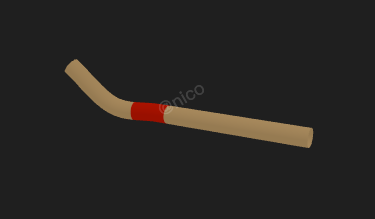
Flow Tube
你将学到什么
- 自定义 ShaderMaterial / 修改内置 shader
- 相机交互控制器
- requestAnimationFrame 渲染循环
- Clock 帧间隔计时
效果说明
Three.js 业务向场景组合。
应用场景 · Three.js
核心概念
ShaderMaterial 完全自定义 GLSL;
onBeforeCompile可在内置材质 shader 中注入代码。关注uniforms与 rAF 更新。OrbitControls 轨道旋转缩放;开
enableDamping时每帧需controls.update()。
实现步骤
- 搭建 Scene / Camera / Renderer 与 OrbitControls
- 定义材质/shader 与 uniforms,rAF 中更新
- rAF 循环中 update 并 render
代码要点
create_pipe()— 案例中的独立逻辑模块,建议在线编辑器中跳转阅读animation()— 案例中的独立逻辑模块,建议在线编辑器中跳转阅读
源码
js
import * as THREE from "three";
import { OrbitControls } from "three/examples/jsm/controls/OrbitControls.js";
const box = document.getElementById("box");

const scene = new THREE.Scene();

const camera = new THREE.PerspectiveCamera(
  75,
  box.clientWidth / box.clientHeight,
  0.1,
  1000
);

camera.position.set(30, 10, 10)

const renderer = new THREE.WebGLRenderer({
  antialias: true,
  alpha: true,
  logarithmicDepthBuffer: true,
});

renderer.setSize(box.clientWidth, box.clientHeight);
box.appendChild(renderer.domElement);

new OrbitControls(camera, renderer.domElement);

window.onresize = () => {
  renderer.setSize(box.clientWidth, box.clientHeight);

  camera.aspect = box.clientWidth / box.clientHeight;
  camera.updateProjectionMatrix();
};

animate();

function animate() {
  requestAnimationFrame(animate);
  renderer.render(scene, camera);
}

scene.add(new THREE.AmbientLight(0xffffff, 1));
scene.add(new THREE.DirectionalLight(0xffffff, 0.25));

function create_pipe() {
    const cps = Array.from({ length: 6 }).fill(0).map((_, idx, arr) => {
        let init = -(arr.length - 1)
        return new THREE.Vector3(
            init + idx * 2, Math.random() < 0.5 ? -1 : 1,
            -init - idx * 2
        )
    })
    const curve = new THREE.CatmullRomCurve3(cps)
    let g = new THREE.TubeGeometry(curve, 100, 0.5, 32)
    const m = new THREE.MeshLambertMaterial({
        color: 0xface8d,
        side: THREE.DoubleSide,

    })
    let length = curve.getLength()
    let uniforms = {
        totalLength: { value: length },
        pipeFittingAt: { value: 2 },
        pipeFittingWidth: { value: 2 },
        pipeFittingColor: { value: new THREE.Color(0xff2200) }
    };

    m.onBeforeCompile = shader => {
        shader.uniforms.totalLength = uniforms.totalLength;
        shader.uniforms.pipeFittingAt = uniforms.pipeFittingAt;
        shader.uniforms.pipeFittingWidth = uniforms.pipeFittingWidth;
        shader.uniforms.pipeFittingColor = uniforms.pipeFittingColor;
        shader.fragmentShader = `
        #define S(a, b, c) smoothstep(a, b, c)
        uniform float totalLength;
        uniform float pipeFittingAt;
        uniform float pipeFittingWidth;
        uniform vec3 pipeFittingColor;
        ${shader.fragmentShader}
        `.replace(
            `#include <color_fragment>`,
            `#include <color_fragment>
        float normAt = pipeFittingAt / totalLength;
        float normWidth = pipeFittingWidth / totalLength;
        float hWidth = normWidth * 0.5;
        float fw = fwidth(vUv.x);
        float f = S(hWidth + fw, hWidth, abs(vUv.x - normAt));
        diffuseColor.rgb = mix(diffuseColor.rgb, pipeFittingColor, f);
        // diffuseColor.rgb = mix(diffuseColor.rgb, vec3(1, 1, 0), S(fw,  0., abs(vUv.x - normAt)));
      `
        )
    }
    m.defines = { 'USE_UV': "" }
    let o = new THREE.Mesh(g, m);
    scene.add(o);
    let clock = new THREE.Clock()
    function animation() {
        uniforms.pipeFittingAt.value += clock.getDelta() * 5
        if (uniforms.pipeFittingAt.value - 1 > uniforms.totalLength.value) {
            uniforms.pipeFittingAt.value = 0
        }
        requestAnimationFrame(animation)
    }
    animation()
}

create_pipe()
小结
应用场景 · Three.js