
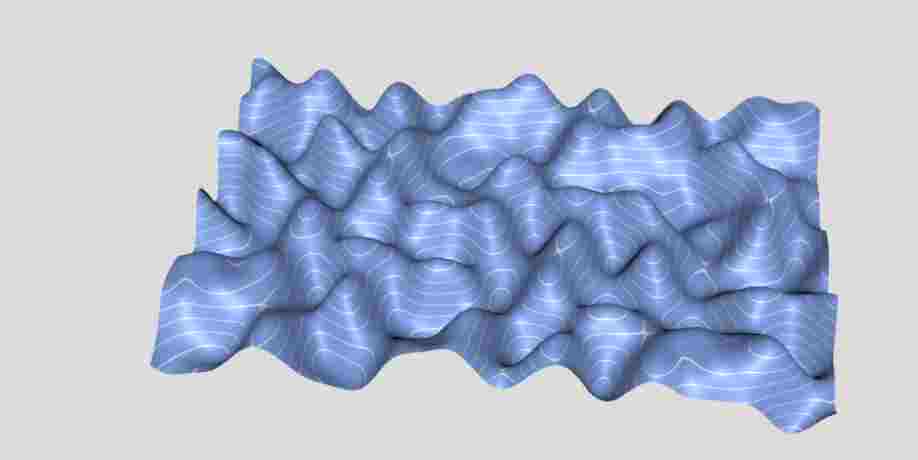
等值线
Isoline
你将学到什么
- 相机交互控制器
- 天空盒与环境贴图
- requestAnimationFrame 渲染循环
效果说明
Three.js 业务向场景组合。
应用场景 · Three.js
核心概念
OrbitControls 轨道旋转缩放;开
enableDamping时每帧需controls.update()。CubeTexture 六面贴图作
scene.background;scene.environment供 PBR 材质反射。
实现步骤
- 搭建 Scene / Camera / Renderer 与 OrbitControls
- rAF 循环中 update 并 render
代码要点
animationLoop()— 案例中的独立逻辑模块,建议在线编辑器中跳转阅读
源码
js
import * as THREE from 'three';
import { OrbitControls } from "three/examples/jsm/Addons.js";
import { SimplexNoise } from 'three/examples/jsm/math/SimplexNoise.js';
const DOM = document.getElementById('box')

var scene = new THREE.Scene();
scene.background = new THREE.Color('gainsboro');

var camera = new THREE.PerspectiveCamera(30, innerWidth / innerHeight);
camera.position.set(0, 4, 4);
camera.lookAt(scene.position);

var renderer = new THREE.WebGLRenderer({ antialias: true });
renderer.setSize(innerWidth, innerHeight);
renderer.setAnimationLoop(animationLoop);
DOM.appendChild(renderer.domElement);

window.addEventListener("resize", () => {
    camera.aspect = innerWidth / innerHeight;
    camera.updateProjectionMatrix();
    renderer.setSize(innerWidth, innerHeight);
});

var controls = new OrbitControls(camera, renderer.domElement);
controls.enableDamping = true;
controls.autoRotate = true;

var light = new THREE.DirectionalLight('white', 3);
light.position.set(1, 1, 1);
scene.add(light);

// next comment

// a texture with isolines
var canvas = document.createElement('CANVAS');
canvas.width = 16;
canvas.height = 128;

var context = canvas.getContext('2d');
context.fillStyle = 'royalblue';
context.fillRect(0, 0, 16, 128);
context.fillStyle = 'white';
context.fillRect(0, 0, 16, 6);

var isoTexture = new THREE.CanvasTexture(canvas);
isoTexture.repeat.set(1, 10);
isoTexture.wrapS = THREE.RepeatWrapping;
isoTexture.wrapT = THREE.RepeatWrapping;

// some terrain with simlex noise
// reference https://codepen.io/boytchev/full/gOQQRLd
var geometry = new THREE.PlaneGeometry(6, 4, 150, 100),
    pos = geometry.getAttribute('position'),
    uv = geometry.getAttribute('uv'),
    simplex = new SimplexNoise();

for (var i = 0; i < pos.count; i++) {
    var x = pos.getX(i),
        y = pos.getY(i),
        z = 0.4 * simplex.noise(x, y);

    pos.setZ(i, z);
    uv.setXY(i, 0, z);
}

geometry.computeVertexNormals();

var terrain = new THREE.Mesh(
    geometry,
    new THREE.MeshPhysicalMaterial({
        roughness: 0.5,
        metalness: 0.2,
        side: THREE.DoubleSide,
        map: isoTexture,
    })
);
terrain.rotation.x = -Math.PI / 2;
scene.add(terrain);
function animationLoop() {
    controls.update();
    light.position.copy(camera.position);
    renderer.render(scene, camera);
}
// test robot test robot test
小结
应用场景 · Three.js