
精灵标签
Sprite Label
你将学到什么
- Canvas 2D 动态画标签(图 + 字)
- CanvasTexture 转 Three.js 纹理
sprite.center锚点、devicePixelRatio高清
效果说明
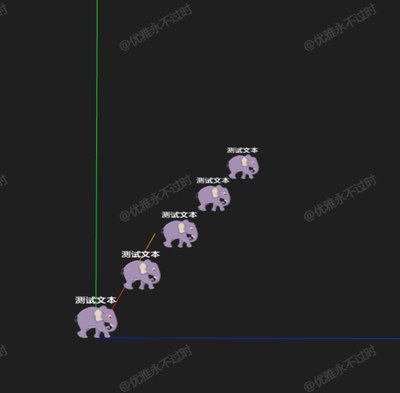
5 个 Sprite 沿对角线排列,每个显示 头像 +「测试文本」,纹理来自运行时 canvas 绘制。
核心概念
js
const canvas = document.createElement('canvas');
const ctx = canvas.getContext('2d');
// 高 DPI
canvas.width = logicalWidth * devicePixelRatio;
ctx.scale(devicePixelRatio, devicePixelRatio);
ctx.drawImage(img, ...);
ctx.fillText(text, ...);

const texture = new THREE.CanvasTexture(canvas);
texture.colorSpace = THREE.SRGBColorSpace;

const sprite = new THREE.Sprite(new THREE.SpriteMaterial({ map: texture }));
sprite.center.set(0.5, 0);  // 底边中心锚点,适合「桩子上的牌」
改 canvas 内容后需 texture.needsUpdate = true。
小结
基础案例 · Three.js · 20/35