
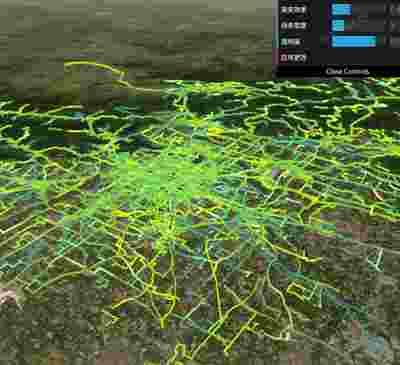
交通线路
Transport Line
你将学到什么
- Cesium Viewer 初始化
- Cesium 影像图层
- GUI 面板调试参数
效果说明
Cesium 接第三方库或扩展能力。
扩展功能 · Cesium.js
核心概念
Viewer 封装地球、相机、图层;可关闭 animation/timeline 等 UI 精简界面。
ImageryLayer 叠加 XYZ/WMTS/ArcGIS 等底图,
imageryLayers.add/remove管理。
实现步骤
- 初始化
Cesium.Viewer与底图图层 - 添加 Entity / Primitive / DataSource 等业务对象
- 按需
camera.flyTo定位视角
代码要点
registerFlowLineMaterial()— 案例中的独立逻辑模块,建议在线编辑器中跳转阅读loadLinesData()— 案例中的独立逻辑模块,建议在线编辑器中跳转阅读addLineDatasPrimitive()— 案例中的独立逻辑模块,建议在线编辑器中跳转阅读updateLines()— 案例中的独立逻辑模块,建议在线编辑器中跳转阅读
源码
js
import * as Cesium from 'cesium'
import * as dat from 'dat.gui'

// 注册自定义流动线材质
function registerFlowLineMaterial() {
    Cesium.Material.PolylineFlowType = 'PolylineFlow';
    Cesium.Material.PolylineFlowSource = `
        uniform vec4 color;
        uniform float speed;
        uniform float percent;
        uniform float gradient;

        czm_material czm_getMaterial(czm_materialInput materialInput) {
            czm_material material = czm_getDefaultMaterial(materialInput);

            // 获取纹理坐标
            float st = materialInput.st.s;

            // 计算流动效果
            float time = czm_frameNumber * speed / 1000.0;
            float currentPos = fract(time - st);

            // 计算流动边缘
            float trailPos = smoothstep(0.0, percent, currentPos);
            float glowPos = smoothstep(0.0, gradient * percent, currentPos) *
                           smoothstep(percent, percent * (1.0 - gradient), currentPos);

            // 计算颜色
            vec4 trailColor = color;
            vec4 glowColor = vec4(color.rgb * 1.5, color.a * 0.5);

            material.diffuse = color.rgb;
            material.alpha = trailPos * color.a;
            material.emission = glowPos * glowColor.rgb;

            return material;
        }
    `;

    // 修改着色器代码,增加更丰富的视觉效果
    Cesium.Material.PolylineFlowEnhancedType = 'PolylineFlowEnhanced';
    Cesium.Material.PolylineFlowEnhancedSource = `
        uniform vec4 color;
        uniform float speed;
        uniform float percent;
        uniform float gradient;
        uniform float pulse;

        czm_material czm_getMaterial(czm_materialInput materialInput) {
            czm_material material = czm_getDefaultMaterial(materialInput);

            // 获取纹理坐标
            float st = materialInput.st.s;

            // 计算流动效果
            float time = czm_frameNumber * speed / 1000.0;
            float currentPos = fract(time - st);

            // 增加脉冲动画效果
            float pulseEffect = 1.0 + 0.2 * sin(time * 3.14 * pulse);

            // 计算流动边缘 - 增强平滑度
            float trailPos = smoothstep(0.0, percent * pulseEffect, currentPos);
            float glowPos = smoothstep(0.0, gradient * percent, currentPos) *
                          smoothstep(percent, percent * (1.0 - gradient), currentPos);

            // 增强发光效果和渐变
            vec4 trailColor = color;
            vec4 glowColor = vec4(color.rgb * 1.8, color.a * 0.7);

            // 边缘发光增强
            float edgeGlow = smoothstep(0.4, 0.5, abs(materialInput.st.t - 0.5)) * 0.5;

            material.diffuse = mix(color.rgb, color.rgb * 1.2, edgeGlow);
            material.alpha = trailPos * color.a;
            material.emission = (glowPos * glowColor.rgb) + (edgeGlow * color.rgb);

            return material;
        }
    `;

    Cesium.Material._materialCache.addMaterial(Cesium.Material.PolylineFlowType, {
        fabric: {
            type: Cesium.Material.PolylineFlowType,
            uniforms: {
                color: new Cesium.Color(1.0, 0.0, 0.0, 0.7),
                speed: 5.0,
                percent: 0.15,
                gradient: 0.4
            },
            source: Cesium.Material.PolylineFlowSource
        },
        translucent: function () {
            return true;
        }
    });

    // 注册增强版流动线材质
    Cesium.Material._materialCache.addMaterial(Cesium.Material.PolylineFlowEnhancedType, {
        fabric: {
            type: Cesium.Material.PolylineFlowEnhancedType,
            uniforms: {
                color: new Cesium.Color(0.8, 1.0, 0.0, 0.9),
                speed: 7.0,
                percent: 0.15,
                gradient: 0.4,
                pulse: 0.5
            },
            source: Cesium.Material.PolylineFlowEnhancedSource
        },
        translucent: function () {
            return true;
        }
    });
}

// 注册材质
registerFlowLineMaterial();

const box = document.getElementById('box')
// ... 完整源码见在线案例编辑器
小结
扩展功能 · Cesium.js