
光线
Light
你将学到什么
- 常见光源类型及适用场景
- 材质是否受光 的决定因素
DirectionalLightHelper可视化光源方向
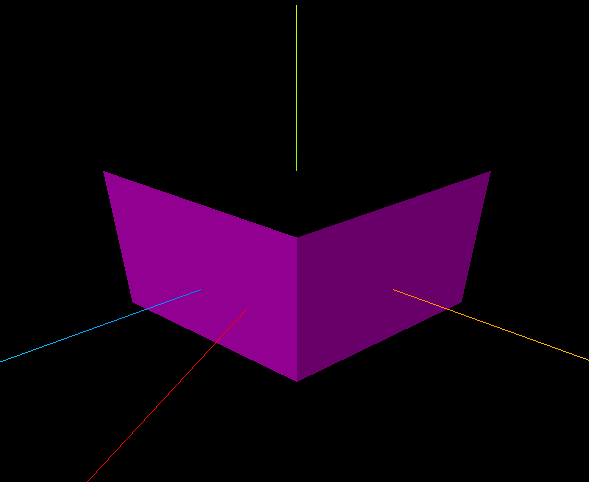
效果说明
一个受光照影响的立方体,能看到明暗面;场景中还有 平行光辅助线(红色线段)指示光源位置与照射方向。
核心概念
材质与光照
| 材质 | 是否受光 | 典型用途 |
|---|---|---|
MeshBasicMaterial | 否 | UI、线框、不受光纯色 |
MeshLambertMaterial | 是(漫反射) | 哑光表面 |
MeshPhongMaterial | 是(漫反射+高光) | 塑料、金属感 |
MeshStandardMaterial | 是(PBR 物理) | 现代项目默认 |
本案例用 MeshLambertMaterial(无参数 = 默认白色),必须加光源才能看见。
光源类型
| 类型 | 特点 | 衰减 |
|---|---|---|
AmbientLight | 全局均匀照明,无方向 | 无 |
DirectionalLight | 平行光,模拟太阳 | 无 |
PointLight | 点光源,向四周发射 | 有 distance/decay |
SpotLight | 锥形聚光 | 有 angle/penumbra |
js
// 平行光 = 颜色 + 强度 + 位置(方向由 position 指向原点决定)
const light = new THREE.DirectionalLight(0xff00ff, 1.0);
light.position.set(100, 0, 200);
scene.add(light);
DirectionalLightHelper(light, size, color) 在场景中画出光源位置与目标方向的参考线,便于调试。
实现步骤
- 创建 Scene +
MeshLambertMaterial的 Mesh(受光材质) - 添加
DirectionalLight并设置 position - 添加
DirectionalLightHelper可视化 - AxesHelper + Camera + Renderer,一次性渲染
代码要点
js
// 受光材质 — 没有光源会是黑色
const material = new THREE.MeshLambertMaterial();

const directionalLight = new THREE.DirectionalLight(0xff00ff, 1.0);
directionalLight.position.set(100, 0, 200);
scene.add(directionalLight);

// 辅助线:第二个参数是参考线长度
const dirLightHelper = new THREE.DirectionalLightHelper(directionalLight, 5, 0xff0000);
scene.add(dirLightHelper);
常见错误
加了 MeshStandardMaterial 但忘记加光 → 全黑。可先加 AmbientLight(0xffffff, 0.5) 保底,再用平行光塑造明暗。
源码
js
import * as THREE from 'three';

// 1、影响哪些材质
//     不影响:MeshBasicMaterial(基础)
//     影响:  MeshLambertMaterial(漫反射)、MeshPhongMaterial(高光)、MeshPhysicalMaterial(物理)、MeshStandardMaterial(物理)

// 2、光源(分类、颜色、强度、衰减、位置)
//     PointLight(点光源)、SpotLight(聚光灯)、DirectionalLight(平行光)、AmbientLight(环境光)

// 场景
const scene = new THREE.Scene();// 创建场景
const geometry = new THREE.BoxGeometry(100, 100, 100); //几何体
const material = new THREE.MeshLambertMaterial(); //材质
const mesh = new THREE.Mesh(geometry, material); //网格模型
mesh.position.set(0, 10, 0); //网格模型位置
scene.add(mesh);  //场景添加网格模型

// AxesHelper
const axesHelper = new THREE.AxesHelper(150);
scene.add(axesHelper);

// ---------光源-----------
const directionalLight = new THREE.DirectionalLight(0xff00ff, 1.0); //颜色、强度
directionalLight.position.set(100, 0, 200);   //位置
scene.add(directionalLight); //点光源添加到场景中

// -----------光源参考线-----------
const dirLightHelper = new THREE.DirectionalLightHelper(directionalLight, 5, 0xff0000);
scene.add(dirLightHelper);

// 相机
const camera = new THREE.PerspectiveCamera();  //相机
camera.position.set(200, 200, 200); //相机位置
camera.lookAt(0, 10, 0);   //相机观察位置

// 渲染器
const renderer = new THREE.WebGLRenderer(); // 创建渲染器
const box = document.getElementById('box');
renderer.setSize(box.clientWidth, box.clientHeight); //渲染区域
renderer.render(scene, camera); //执行渲染
box.appendChild(renderer.domElement);
小结
- 有光才有影:受光材质必须配合光源
- 平行光适合模拟太阳;室内常用 PointLight + AmbientLight 组合
- 上一篇:辅助线 · 下一篇:几何体 — 内置形状一览
入门案例 · Three.js · 3/15