
顶点颜色
Vertex Color
你将学到什么
geometry.attributes.color为每个顶点指定 RGB- 材质
vertexColors: true启用顶点插值着色 - GPU 如何在三角面内 插值 顶点颜色
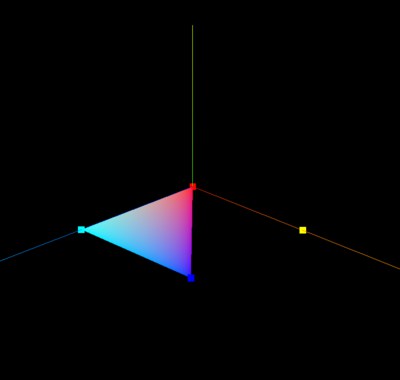
效果说明
三角形的每个顶点颜色不同,面片内部呈现 平滑渐变(GPU 对三个顶点颜色做重心坐标插值)。
核心概念
顶点属性 pipeline
attributes.position  →  顶点位置
attributes.color     →  顶点颜色 (RGB, 0~1)
attributes.normal    →  法线(光照计算)
attributes.uv        →  纹理坐标
js
const colors = new Float32Array([
    1, 1, 1,  // 顶点0 白
    1, 1, 0,  // 顶点1 黄
    1, 1, 1,  // 顶点2 白
    1, 0, 0,  // 顶点3 红
    0, 1, 1,  // 顶点4 青
    0, 0, 1,  // 顶点5 蓝
]);
geometry.attributes.color = new THREE.BufferAttribute(colors, 3);
vertexColors
材质必须开启 vertexColors: true(或传入 THREE.VertexColors 常量,旧版 API),否则只用 material.color:
js
new THREE.PointsMaterial({
    vertexColors: true,  // 使用 attributes.color
    size: 10.0
});
插值原理: 三角形内任意点的颜色 = 三个顶点颜色按距离加权平均。这是 GLSL varying 变量的基础机制,自定义 shader 同样适用。
实现步骤
- 定义 position + color 两组 BufferAttribute
- PointsMaterial 开启 vertexColors
- 分别用 Points 和 Mesh 展示(本案例两者共用 material)
代码要点
js
geometry.attributes.color = new THREE.BufferAttribute(colors, 3);

const material = new THREE.PointsMaterial({
    vertexColors: true,
    size: 10.0
});
// Mesh 需 MeshBasicMaterial({ vertexColors: true })
常见错误
写了 attributes.color 但材质没开 vertexColors → 仍然显示单色。
源码
js
import * as THREE from 'three';
import { OrbitControls } from 'three/examples/jsm/controls/OrbitControls.js'

const scene = new THREE.Scene();
const geometry = new THREE.BufferGeometry();
const vertices = new Float32Array([
    0, 0, 0,  50, 0, 0,  50, 0, 50,
    0, 0, 0,  0, 0, 50,  50, 0, 50,
]);
geometry.attributes.position = new THREE.BufferAttribute(vertices, 3);

const colors = new Float32Array([
    1, 1, 1,  1, 1, 0,  1, 1, 1,
    1, 0, 0,  0, 1, 1,  0, 0, 1,
]);
geometry.attributes.color = new THREE.BufferAttribute(colors, 3);

const material = new THREE.PointsMaterial({ vertexColors: true, size: 10.0 });
const points = new THREE.Points(geometry, material);
scene.add(points);

const mesh = new THREE.Mesh(geometry, new THREE.MeshBasicMaterial({ vertexColors: true, side: THREE.DoubleSide }));
scene.add(mesh);
// ... camera, renderer
小结
- 顶点颜色适合热力图、高度着色、无纹理渐变
- 下一篇:旋转缩放平移 — 直接变换几何体顶点
入门案例 · Three.js · 9/15